Gmail Integration Guide
Overview
The Gmail integration allows your NINA workflows to connect with Google's Gmail service for email management. This integration enables you to send, receive, reply to, and manage emails, as well as work with labels, threads, and drafts - all directly from your workflows.
Status
At present, our integration supports core functionalities related to email message management and organization. The integration covers:
- Message Management: Create, send, get, delete, and apply labels to messages
- Thread Management: Get, delete, trash/untrash, and label operations for email threads
- Label Management: Create, get, and delete labels for email organization
- Draft Management: Create, get, and delete email drafts
Credential Configuration
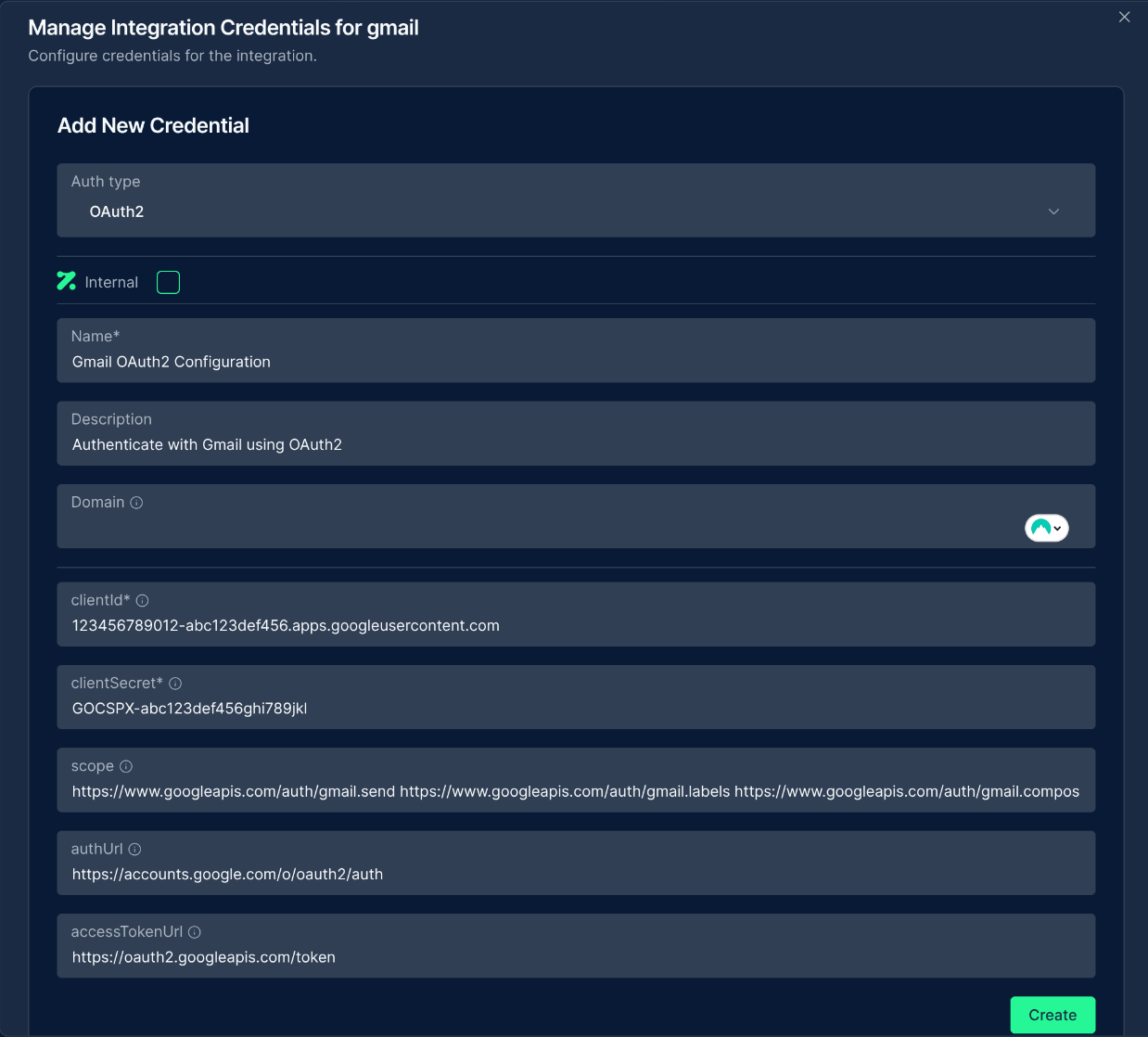
Before using the Gmail integration in your workflows, you need to configure credentials for authentication. The NINA platform supports OAuth2 authentication for Gmail:
Authentication Methods
OAuth2 Authentication
| Field | Description | Example |
|---|---|---|
| Client ID | OAuth2 client ID | 123456789012-abc123def456.apps.googleusercontent.com |
| Client Secret | OAuth2 client secret | GOCSPX-abc123def456ghi789jkl |
| Scope | OAuth2 scopes | https://www.googleapis.com/auth/gmail.send |
| Auth URL | Authorization URL | https://accounts.google.com/o/oauth2/auth |
| Access Token URL | Access token URL | https://oauth2.googleapis.com/token |
If you need multiple scopes, add them one after another separated by space, e.g.:
https://www.googleapis.com/auth/gmail.send https://www.googleapis.com/auth/gmail.labels
How to set up OAuth2:
- Go to the Google Cloud Console
- Create a new project (or select an existing one)
- Navigate to "APIs & Services" > "Credentials"
- Configure the OAuth consent screen:
- Select User Type (Internal or External)
- Add app information and developer contact details
- Add the Gmail API scope (
https://www.googleapis.com/auth/gmail.send)
- Create OAuth client ID credentials:
- Select "Web application" as the application type
- Add authorized redirect URIs:
- For POC environment:
https://poc.zynap.com/api/v1/oauth2/callback - For Production environment:
https://platform.zynap.com/api/v1/oauth2/callback
- For POC environment:
- Note your Client ID and Client Secret
- Enable the Gmail API in "APIs & Services" > "Library"
Creating a Gmail Credential
- Navigate to the Credentials section in NINA
- Click Add New Credential
- Fill in the credential details:
- Name: A descriptive name (e.g., "Gmail Production")
- Description: Optional details about the credential's purpose
- Integration Service: Select "Gmail"
- Fill in the authentication fields (Client ID, Client Secret, etc.)
- Click Create to verify credentials, this will lead to a Google Authentication page to confirm the access that is needed.
Supported Resources and Operations
The Gmail integration supports the following resources and operations:
Message
| Operation | Description |
|---|---|
| Send | Sends a new email message |
| Reply | Replies to an existing email message |
| Get | Retrieves details of a specific message |
| Get All | Retrieves multiple messages based on criteria |
| Delete | Deletes a message |
| Mark As Read | Marks a message as read |
| Mark As Unread | Marks a message as unread |
| Add Labels | Adds one or more labels to a message |
| Remove Labels | Removes one or more labels from a message |
Label
| Operation | Description |
|---|---|
| Create | Creates a new label |
| Get | Retrieves details of a specific label |
| Get All | Retrieves all labels |
| Delete | Deletes a label |
Thread
| Operation | Description |
|---|---|
| Get | Retrieves details of a specific thread |
| Get All | Retrieves multiple threads based on criteria |
| Delete | Deletes a thread |
| Reply | Replies to a thread |
| Trash | Moves a thread to trash |
| Untrash | Recovers a thread from trash |
| Add Labels | Adds one or more labels to a thread |
| Remove Labels | Removes one or more labels from a thread |
Draft
| Operation | Description |
|---|---|
| Create | Creates a new draft email |
| Get | Retrieves details of a specific draft |
| Get All | Retrieves all drafts |
| Delete | Deletes a draft |
Parameter Merging
The Gmail integration takes full advantage of NINA's parameter merging capabilities:
Parameter Sources (in order of precedence)
- Node Parameters: Parameters configured directly in the Gmail Integration Node
- Extracted Parameters: Parameters automatically extracted from the input data
- Input Data: The complete input data from upstream nodes
When a Gmail Integration Node executes:
- It combines parameters from all sources
- Node parameters take precedence over extracted parameters
- The combined parameters are used to execute the Gmail operation
Example: Sending Emails
Basic Email Sending
Below is an example of sending a basic email message:
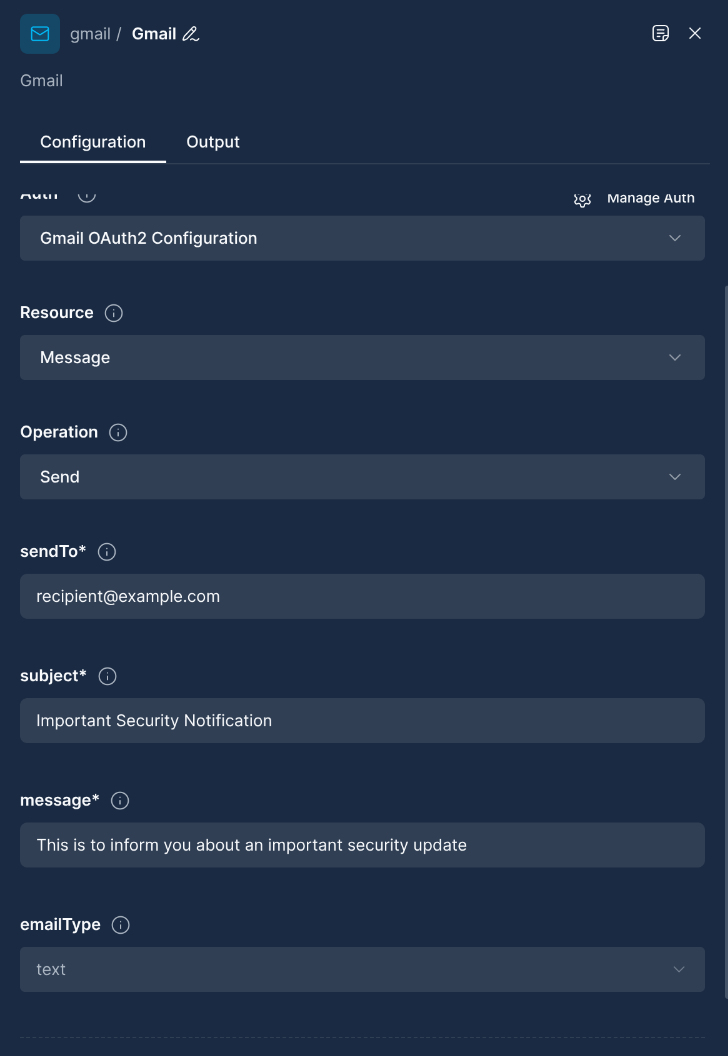
Node Configuration:
{
  "resource": "message",
  "operation": "send",
  "parameters": {
    "sendTo": "[email protected]",
    "subject": "Important Security Notification",
    "message": "This is to inform you about an important security update.",
    "emailType": "text",
    "additionalFields": {
      "ccList": "[email protected]",
      "bccList": "[email protected]"
    }
  }
}
Sending HTML Email with Formatting
You can send richly formatted HTML emails:
Node Configuration:
{
  "resource": "message",
  "operation": "send",
  "parameters": {
    "sendTo": "[email protected]",
    "subject": "Monthly Security Report",
    "message": "<h1>Security Report</h1><p>Please review the <strong>attached</strong> security report for this month.</p><ul><li>Finding 1</li><li>Finding 2</li></ul>",
    "emailType": "html",
    "additionalFields": {
      "senderName": "Security Team <[email protected]>",
      "replyTo": "[email protected]"
    }
  }
}
Example: Managing Labels
Creating a New Label
Create a new label for organizing emails:
Node Configuration:
{
  "resource": "label",
  "operation": "create",
  "parameters": {
    "name": "Security Alerts"
  }
}
Adding Labels to Messages
Add labels to one or more messages:
Node Configuration:
{
  "resource": "message",
  "operation": "addLabels",
  "parameters": {
    "messageId": "18464b01a3842167",
    "labelIds": [
      {
        "id": "Label_42",
        "name": "Security Alerts"
      },
      {
        "id": "Label_18",
        "name": "Important"
      }
    ]
  }
}
Example: Working with Threads
Getting Thread Details
Retrieve details of an email thread:
Node Configuration:
{
  "resource": "thread",
  "operation": "get",
  "parameters": {
    "threadId": "17640ba3c8f12e98"
  }
}
Replying to a Thread
Reply to an existing email thread:
Node Configuration:
{
  "resource": "thread",
  "operation": "reply",
  "parameters": {
    "threadId": "17640ba3c8f12e98",
    "message": "Thank you for your inquiry. We'll look into this issue and get back to you soon.",
    "additionalFields": {
      "ccList": "[email protected]"
    }
  }
}
Example: Working with Drafts
Creating a Draft Email
Create a draft email to send later:
Node Configuration:
{
  "resource": "draft",
  "operation": "create",
  "parameters": {
    "sendTo": "[email protected]",
    "subject": "Project Proposal",
    "message": "Dear Client,\n\nPlease find attached our proposal for the upcoming project.\n\nBest regards,\nYour Team",
    "additionalFields": {
      "ccList": "[email protected],[email protected]"
    }
  }
}
Troubleshooting
Common Issues
-
Authentication Errors:
- Ensure your OAuth2 client ID and secret are correct
- Verify that you've authorized the required scopes
- Check if your authorization token has expired
-
Rate Limiting:
- Gmail API has usage limits (see Google API Limits)
- Implement exponential backoff for retries
-
Permission Issues:
- Ensure your OAuth consent screen includes all required scopes
- For organizational accounts, check if admin consent is required
Best Practices
-
Email Composition:
- Use HTML formatting judiciously
- Test your emails on different email clients
- Avoid excessive attachments
-
Label Management:
- Use descriptive label names
- Avoid creating too many labels (can impact performance)
- Consider using nested labels for organization
-
Threading:
- Preserve email thread integrity when replying
- Be aware that thread organization is determined by Gmail's algorithm
API Reference
For more detailed information about the Gmail API, refer to the official Gmail API documentation. Updated: 2025-12-02