API Node Guide
Overview
The API Node lets your NINA workflows talk to external APIs and web services. Depending on the endpoint you choose, it can fetch data into a workflow or send workflow data out to another system — enabling integrations with threat intelligence feeds, security platforms, internal services, and more.
A key thing to understand up front: you don't manually pick a "direction" for the node. The node automatically works as an input (fetch) or output (send) node based on the HTTP method of the endpoint you select — see Input vs Output behavior.
Use Cases
- Fetching data from external security tools and services
- Retrieving threat intelligence from public APIs
- Sending scan results to security platforms
- Querying domain information from WHOIS or DNS services
- Interacting with custom internal APIs
- Retrieving vulnerability data from databases
- Posting workflow results to webhooks
How It Fits Together
NINA separates the connection details from the node that uses them, so a single API can be reused across many nodes and workflows:
- API — the service you're connecting to (base URL + authentication). Reusable.
- Endpoint — a specific operation on that API (path + HTTP method + optional schemas). Each API can have many endpoints.
- API Node — a node placed on the canvas that points at one API + one endpoint and supplies the request details (parameters, headers, body).
You manage APIs, endpoints, and credentials through the Manage menu inside the node's configuration panel, then reference them from the node itself.
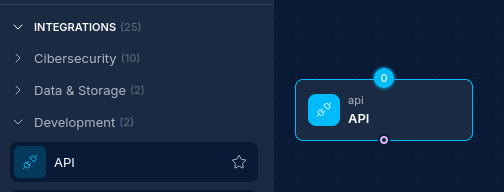
Creating an API Node
Basic Setup
- Drag an API Node from the node palette onto your workflow canvas.
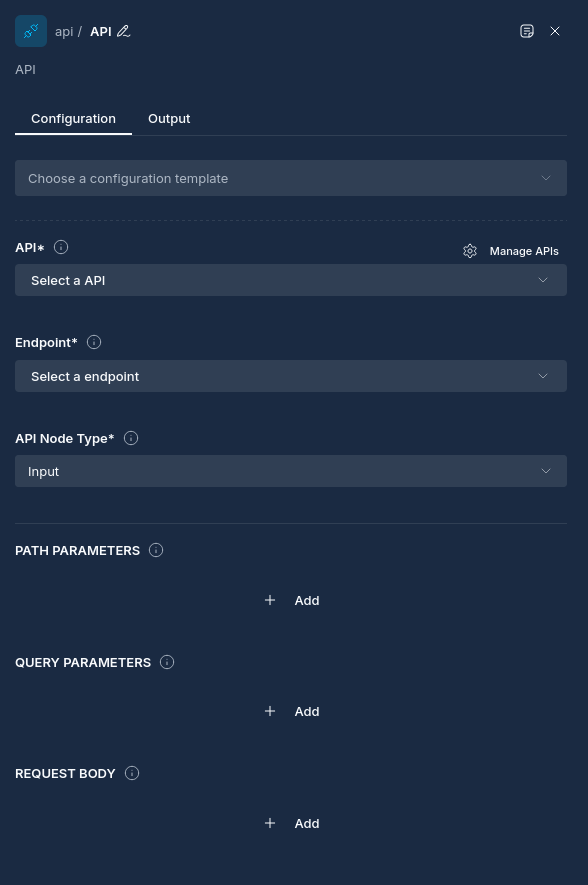
- Open the node and, if you haven't already, use Manage → APIs to define the API you want to call (see Defining an API).
- Select the API in the node.
- Select an Endpoint. The endpoint's HTTP method determines whether this node fetches or sends data (see Input vs Output behavior).
- Fill in any Path parameters, Query parameters, Request body, and Headers the request needs.
- (Output endpoints only) Optionally enable Include metadata fields.
- Connect upstream nodes if you want to supply request data dynamically at runtime.
Defining an API
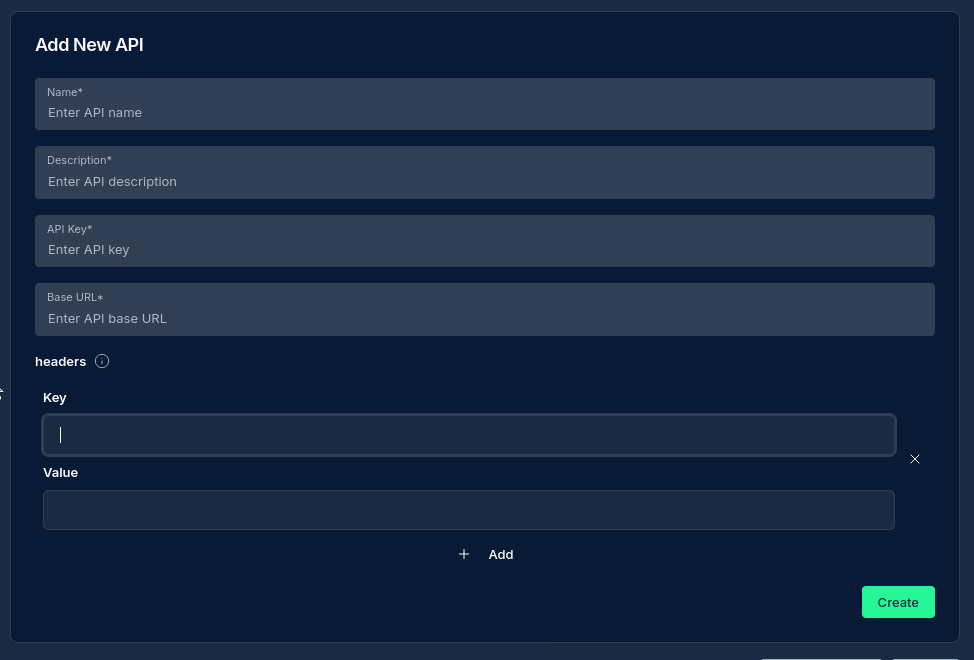
Open Manage → APIs from the node panel. Each API has three tabs: API, Specification, and Endpoints (the last two unlock after the API is saved).
API tab
| Field | Required | Description |
|---|---|---|
| Name | Yes | A descriptive name for the API. |
| Description | Yes | What the API is for. |
| Authentication | — | Either Credentials (recommended) or API Key (legacy). See Authentication. |
| Credential / API Key | — | The chosen credential, or a raw API key, depending on the Authentication option. |
| Base URL | Yes | The root URL for all endpoints (e.g. https://api.example.com). |
| Skip SSL certificate verification | — | When enabled, the API's TLS certificate is not verified. Only enable for trusted internal endpoints with self-signed or untrusted certificates. |
| Headers | — | HTTP headers included on every call to this API (key/value pairs). |
Endpoints tab
Each API can define multiple endpoints:
| Field | Required | Description |
|---|---|---|
| Name | Yes | A descriptive name for the endpoint. |
| Path | Yes | The path relative to the Base URL (e.g. /v1/users or /users/{id}). |
| Method | Yes | HTTP method: GET, POST, PUT, DELETE, or PATCH. |
| Input schema | — | Optional JSON schema describing the request body. |
| Output schema | — | Optional JSON schema describing the response. |
Note: The endpoint's Method does more than describe the call — it decides how the node behaves. A GET endpoint makes the node an input (fetch) node; any other method makes it an output (send) node.
Specification tab — import endpoints from a spec file
Instead of adding endpoints by hand, you can upload an API specification and NINA will generate the endpoints for you.
- Accepted formats: OpenAPI 3.x and Swagger 2.0, as
.json,.yaml, or.ymlfiles. - What gets imported: every path/operation using GET, POST, PUT, DELETE, or PATCH becomes an endpoint. Request and success-response (
200/201) schemas are imported as the endpoint's input/output schemas where present. - Not supported: cURL commands, Postman collections, HAR files, or free-text/Markdown docs.
Note: Uploading a spec adds the parsed endpoints to the API; it does not replace existing ones. Re-uploading the same spec can create duplicates, so review the Endpoints list afterwards.
Node Configuration Options
These are set on the node itself (not the API definition):
| Property | Description |
|---|---|
| Name | The node's label on the canvas (edited via the pencil icon in the panel header). |
| API | The API definition this node uses. |
| Endpoint | The specific endpoint to call (also determines fetch vs send behavior). |
| Path parameters | Values substituted into {...} placeholders in the endpoint path. |
| Query parameters | Key/value pairs appended to the request URL. |
| Request body | Key/value pairs sent in the request body (used by output endpoints). |
| Headers | Custom headers for this node's request (merged with the API's headers). |
| Include metadata | (Output endpoints only) Selectively add workflow context fields to the request body. |
How values are entered: Path parameters, query parameters, request body, and headers are all entered as key/value rows in the UI (an Add button creates new rows) — not as raw JSON. The JSON snippets shown throughout this guide represent the resulting data, which is handy when an upstream node needs to produce the same structure dynamically (see Dynamic Parameters).
Input vs Output behavior
The node's role is derived automatically from the selected endpoint's HTTP method — there is no manual in/out switch.
Input (fetch) — GET endpoints
- Triggered when the selected endpoint uses GET.
- Makes a GET request to the constructed URL.
- Does not require an upstream connection (though it can still merge parameters from one — see below).
- Stores the response as the node's output for downstream nodes.
- The response must be valid JSON; a non-JSON response causes the node to fail (see Troubleshooting).
Output (send) — POST/PUT/DELETE/PATCH endpoints
- Triggered when the selected endpoint uses any method other than GET.
- Makes a request using the endpoint's configured method.
- Sends a request body assembled from node config, upstream data, and optional metadata.
- Stores the API response as the node's output.
- The Include metadata section is only available for these endpoints.
Path and Query Parameters
Path Parameters
Path parameters replace {...} placeholders in the endpoint path. For an endpoint path of:
/users/{userId}/posts/{postId}
with path parameters:
{
  "userId": "123",
  "postId": "456"
}
the final path becomes /users/123/posts/456.
Query Parameters
Query parameters are appended to the URL as key=value pairs. With:
{
  "limit": "10",
  "sort": "date",
  "order": "desc"
}
the URL includes ?limit=10&sort=date&order=desc. Values are sent as text.
Custom Headers
Headers can come from three places and are merged per-key — each header key takes its value from the highest-priority source that defines it, and non-conflicting headers from every source are kept.
Precedence (lowest → highest):
- API Headers — headers defined on the API (apply to all its endpoints).
- Upstream Node Headers — a
headersobject provided in an upstream node's output. - Node Headers — headers configured on this API Node.
Authentication headers (e.g. Authorization) are added automatically from the API's authentication settings — you don't need to set them manually.
Example
API Headers:
{ "X-Service": "NINA", "X-Environment": "production" }
Upstream Node output:
{ "headers": { "X-Environment": "staging", "X-Request-ID": "upstream-12345" } }
Node Headers:
{ "X-Request-ID": "node-99999", "X-Priority": "high" }
Merged result:
{
  "X-Service": "NINA",          // from API (no conflict)
  "X-Environment": "staging",   // upstream overrides API
  "X-Request-ID": "node-99999", // node overrides upstream
  "X-Priority": "high"          // from node (no conflict)
}
Workflow Metadata (Output endpoints)
For output endpoints you can attach workflow context to the request body via Include metadata — useful when the receiving system needs to know which workflow or execution triggered the call. Each field is a toggle in the UI:
| UI toggle | Field added to body | Value |
|---|---|---|
| Workflow id | workflow_id | The workflow's ID |
| Workflow execution id | workflow_execution_id | The current execution's ID |
| Node id | node_id | This node's ID |
| Previous node id | previous_node_id | The upstream node's ID |
When enabled, these are merged into the request body:
{
  "workflow_id": "550e8400-e29b-41d4-a716-446655440000",
  "workflow_execution_id": "7c9e6679-7425-40de-944b-e07fc1f90ae7",
  "node_id": "a1b2c3d4-e5f6-7890-abcd-ef1234567890",
  "previous_node_id": "b2c3d4e5-f6a7-8901-bcde-f12345678901"
}
Use cases: audit trails, correlating API calls with executions, conditional logic on the receiving side, and usage analytics.
Dynamic Parameters from Upstream Nodes
An API Node can pull request details from the output of connected upstream nodes, so a request can be shaped by earlier workflow steps. This applies to both fetch and send nodes.
The upstream node's output JSON can include any of these optional keys:
{
  "path_parameters":  { "userId": "12345", "resourceId": "abc-def" },
  "query_parameters": { "limit": "50", "filter": "active" },
  "request_body":     { "action": "update", "priority": "high" },
  "headers":          { "X-Request-Priority": "high" }
}
Include only the keys you need — all four are optional.
Merge rules
Each of the four groups is merged per-key: values defined on the node win over values from upstream, but non-conflicting keys from both sides are kept. For example, if upstream provides {"userId": "123"} and the node defines {"limit": "50"}, the result is {"userId": "123", "limit": "50"}; if both define the same key, the node's value wins.
- Headers additionally include the API's headers at the lowest priority (API → upstream → node).
- Path / query / request body merge as: upstream (lower) → node (higher).
How a Request Is Built
Input (GET) endpoints
- The URL is built from the API base URL + endpoint path.
- Path parameters (node + upstream, merged) replace
{...}placeholders. - Query parameters (node + upstream, merged) are appended to the URL.
- Authentication and merged headers are attached.
- A GET request is sent.
- The JSON response is stored as the node's output for downstream nodes.
Output (POST/PUT/DELETE/PATCH) endpoints
- Parameters are extracted from upstream node outputs and merged with node config (node wins per-key).
- The URL is built and path/query parameters applied, as above.
- Headers are merged (API → upstream → node) and authentication attached.
- The request body is assembled, in order:
- Selected metadata fields (if any),
- then the merged request body parameters (node + upstream).
- The request is sent using the endpoint's method.
- The API response is stored as the node's output.
Authentication
Authentication is configured on the API (not per node) and applied automatically to every request.
Credentials (recommended) — select a saved credential via Manage → Credentials. Supported types:
- Basic — sends
Authorization: Basic <base64(user:pass)>. - API Token — sends
Authorization: Bearer <token>. - API Key — sends the key either as a header (default
X-API-Key) or as a query parameter (defaultapi_key), depending on the credential's configuration. - OAuth2 — sends
Authorization: Bearer <access-token>and automatically refreshes the token when it expires.
API Key (legacy) — a raw key entered directly on the API, sent as Authorization: Bearer <key>. Retained for backward compatibility; prefer a Credential for new APIs.
Credentials are organization-scoped: a credential can only be used by nodes in the same organization (or global credentials shared across all).
Best Practices
- Reuse APIs: define an API once and reference it from many nodes and workflows.
- Prefer credentials over raw keys: credentials support more auth types (Basic, OAuth2 with refresh, API-key-in-query) and keep secrets managed centrally.
- Understand per-key merging: parameters and headers merge per-key — mix API-level defaults, upstream dynamic values, and node-level overrides freely.
- Use descriptive path-parameter names that match the
{placeholders}in the endpoint path. - Process responses downstream: add a Script Node to extract or transform the API response.
- Keep payloads lean: only send the fields the receiving system needs.
- Only enable the metadata fields the external system actually consumes.
Example Configurations
Example 1: Fetching data from a security API (GET endpoint)
API
- Name:
ThreatIntel API - Base URL:
https://api.threatintel.example.com - Authentication: Credential (API Token)
Endpoint
- Name:
Get Indicators - Path:
/v1/indicators - Method:
GET→ node acts as a fetch node
Node
- Query parameters:
{ "type": "domain", "limit": "100" }
Example 2: Sending scan results to an API (POST endpoint)
API
- Name:
Security Platform API - Base URL:
https://api.securityplatform.example.com - Authentication: Credential (API Token)
Endpoint
- Name:
Submit Scan Results - Path:
/v2/results - Method:
POST→ node acts as a send node
Node
- Request body:
{ "scan_type": "vulnerability", "environment": "production" } - To send data produced earlier in the workflow, have the upstream node output a
request_bodyobject; it is merged into the body at runtime.
Example 3: Custom headers + workflow metadata
API
- Name:
Internal Tracking API - Base URL:
https://internal.tracking.example.com - Headers:
{ "X-Service": "NINA" }
Endpoint
- Name:
Log Workflow Event - Path:
/v1/events - Method:
POST
Node
- Headers (node-level overrides):
{ "X-Priority": "high", "X-Event-Type": "scan-complete" } - Include metadata: Workflow id, Workflow execution id, Previous node id enabled
- Request body:
{ "event": "scan_completed" }
Resulting request
- Headers include:
X-Service,X-Priority,X-Event-Type, plus the auth header from the API. - Body includes:
workflow_id,workflow_execution_id,previous_node_id,event.
Troubleshooting
| Issue | Resolution |
|---|---|
| Authentication failures | Verify the credential/API key is correct and not expired. For OAuth2, confirm the credential can refresh. |
| Connection timeout | Check network connectivity and the API's status. |
| Fetch node fails parsing the response | Input (GET) nodes require a valid JSON response — a plain-text, XML, or empty body will fail. |
| Path parameter errors | Ensure every {placeholder} in the endpoint path has a matching path parameter. |
| 404 Not Found | Verify the base URL and endpoint path. |
| 400 Bad Request | Check the request body against the API's requirements. |
| TLS / certificate errors | For trusted internal endpoints with self-signed certs, enable Skip SSL certificate verification on the API. |
| Header conflicts | Precedence is API → upstream → node; check which source sets the conflicting key. |
| Unexpected parameter values | Parameters merge per-key — check the node config and any upstream node output. |
| Metadata missing from body | Metadata is only available on output (non-GET) endpoints and must be toggled on. |
| Rate limiting | Reduce call frequency or add delays upstream. |
Next Steps
After configuring your API Node, you might want to:
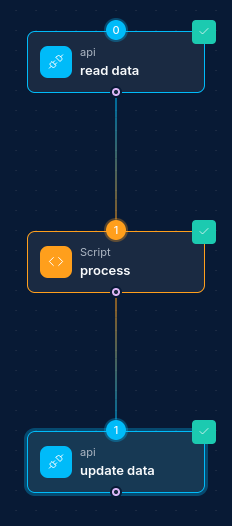
- Add a Script Node to process and transform the API response.
- Use the response to drive conditional workflow branches.
- Chain multiple API calls for richer data gathering.
Updated: 2026-07-20