Credentials-API Integration Guide
Overview
The Credentials-API integration allows your NINA workflows to connect with the internal Credentials API service for searching and retrieving leaked credential information. This integration enables security teams to search for exposed credentials, download credential data, retrieve credential statistics, visualize credential relationships, and submit credential testing results.
This is an internal integration service designed for security operations, breach detection, and threat intelligence workflows within your organization's security infrastructure. It provides a streamlined way to identify potentially compromised credentials associated with your organization or specific domains, and to track the validation status of discovered credentials.
Key Capabilities
- Credential Search: Search for leaked credentials based on domains, emails, usernames, IPs, and other criteria
- Bulk Download: Download credential datasets for offline analysis
- Statistical Analysis: Generate statistics and analytics about credential exposure
- Relationship Mapping: Visualize connections between credentials, domains, and users
- Credential Testing: Submit results from credential validation testing to track their current status
- Session Tracking: Search for session information based on file hashes
Credential Configuration
Before using the Credentials-API integration in your workflows, you need to configure credentials for authentication.
Authentication Methods
The Credentials-API integration uses client credentials authentication:
Client Credentials Authentication
Authentication using client ID and secret:
| Field | Description | Example |
|---|---|---|
| Client ID | Client ID for authentication | client_123456789 |
| Secret | Secret for authentication | secret_abcdef123456789 |
How to get your Client Credentials:
- Contact your organization's security team or administrator for access to the Credentials API
- Request client credentials for the service
- Obtain the client ID and secret for authentication
- Ensure your client has the necessary permissions for the operations you plan to use
Note: This is an internal integration service typically used within your organization's security infrastructure.
Creating a Credentials-API Credential
-
Navigate to the Credentials section in NINA
-
Click Add New Credential
-
Fill in the credential details:
- Name: A descriptive name (e.g., "Credentials API Production")
- Description: Optional details about the credential's purpose
- Integration Service: Select "Credentials API"
- Client ID: Enter your client ID
- Secret: Enter your client secret
-
Click Test Connection to verify credentials
-
Click Save to store the credential
Supported Resources and Operations
The Credentials-API integration supports the following resources and operations:
Credentials
| Operation | Description |
|---|---|
| Search | Searches for leaked credentials based on various criteria |
| Download | Downloads credentials data based on search criteria |
| Get Graph | Retrieves credential relationship graph data |
| Get Stats | Retrieves credential statistics and analytics |
| Add Batch Credential Try | Add a batch of credential try results |
Search Operation Parameters
The search operation supports additional control parameters:
| Parameter | Type | Default | Description |
|---|---|---|---|
| maskPasswords | boolean | true | Mask passwords in the response (keeps first 2 characters visible) |
| simplifiedResponse | boolean | true | Return simplified response with only essential fields. When false, returns the full credential object with metadata |
maskPasswords: Controls password visibility in the response. When enabled (default), passwords are displayed as "pa**********" showing only the first 2 characters. When disabled, full passwords are visible. Use maskPasswords: false only in secure environments with proper access controls.
simplifiedResponse: Controls the level of detail in the response. When enabled (default), returns core credential fields (loginUrl, userName, password, domain information, insertedAt). When disabled, returns the complete credential object including internal IDs, timestamps, file hashes, source information, cookie data, validation status, and additional metadata.
Sessions
| Operation | Description |
|---|---|
| Search | Searches for session information based on file hash |
Parameter Merging
The Credentials-API integration takes advantage of NINA's parameter merging capabilities:
Parameter Sources (in order of precedence)
- Node Parameters: Parameters configured directly in the Credentials-API Integration Node
- Extracted Parameters: Parameters automatically extracted from the input data
- Input Data: The complete input data from upstream nodes
When a Credentials-API Integration Node executes:
- It combines parameters from all sources
- Node parameters take precedence over extracted parameters
- The combined parameters are used to execute the Credentials-API operation
Example: Searching for Credentials
Basic Credential Search
Below is an example of searching for credentials associated with specific domains:
Node Configuration:
{
  "resource": "credentials",
  "operation": "search",
  "parameters": {
    "domains": {
      "mode": "id",
      "value": "example.com"
    },
    "pagination": {
      "page": 1,
      "pageSize": 50
    }
  }
}
This will search for credentials associated with the domain "example.com" and return the first 50 results.
Advanced Credential Search
You can use additional parameters to refine your search:
Node Configuration:
{
  "resource": "credentials",
  "operation": "search",
  "parameters": {
    "domains": [
      {
        "mode": "id",
        "value": "example.com"
      },
      {
        "mode": "id",
        "value": "example.org"
      }
    ],
    "emails": [
      "[email protected]",
      "[email protected]"
    ],
    "usernames": [
      "admin",
      "superuser"
    ],
    "startDate": "2023-01-01T00:00:00Z",
    "endDate": "2023-12-31T23:59:59Z",
    "hasCookies": true,
    "pagination": {
      "page": 1,
      "pageSize": 100
    }
  }
}
This will search for credentials associated with multiple domains and specific emails and usernames, limited to those that include cookies and were leaked during 2023.
Recent Credentials Search
To focus on recently leaked credentials:
Node Configuration:
{
  "resource": "credentials",
  "operation": "search",
  "parameters": {
    "domains": {
      "mode": "list",
      "value": "example.com"
    },
    "insertedAtLastSeconds": 604800,  // Last 7 days (60 * 60 * 24 * 7)
    "pagination": {
      "page": 1,
      "pageSize": 50
    }
  }
}
This will search for credentials associated with "example.com" that were added to the database within the last 7 days.
Controlling Output Format
The Credentials-API integration provides two boolean parameters to control the response format:
maskPasswords
Controls whether passwords are masked in the response. When true (default), only the first 2 characters of passwords are visible.
Node Configuration (Unmasked Passwords):
{
  "resource": "credentials",
  "operation": "search",
  "parameters": {
    "domains": {
      "mode": "id",
      "value": "example.com"
    },
    "maskPasswords": false,
    "pagination": {
      "page": 1,
      "pageSize": 50
    }
  }
}
Security Warning: Disabling password masking exposes full credentials in your workflow. Use with extreme caution and ensure proper security controls are in place.
simplifiedResponse
Controls whether to return simplified response with only essential fields or full credential object with metadata. When true (default), returns only the core credential fields.
Node Configuration (Full Response with Metadata):
{
  "resource": "credentials",
  "operation": "search",
  "parameters": {
    "domains": {
      "mode": "id",
      "value": "example.com"
    },
    "simplifiedResponse": false,
    "pagination": {
      "page": 1,
      "pageSize": 50
    }
  }
}
This will return the full credential object including metadata such as:
- Internal IDs and timestamps
- Source information
- Processing metadata
- Associated file hashes
- Cookie data details
- Additional tracking information
Combined Output Control:
{
  "resource": "credentials",
  "operation": "search",
  "parameters": {
    "domains": {
      "mode": "id",
      "value": "example.com"
    },
    "maskPasswords": false,
    "simplifiedResponse": false,
    "pagination": {
      "page": 1,
      "pageSize": 10
    }
  }
}
This will return full credential objects with unmasked passwords and complete metadata. Use only when necessary and in secure environments.
Example: Downloading Credentials
The download operation allows you to retrieve a downloadable file containing the credential data:
Node Configuration:
{
  "resource": "credentials",
  "operation": "download",
  "parameters": {
    "domains": {
      "mode": "id",
      "value": "example.com"
    },
    "startDate": "2023-01-01T00:00:00Z",
    "endDate": "2023-12-31T23:59:59Z"
  }
}
This will generate a download URL for credentials associated with "example.com" that were leaked during 2023.
Example: Getting Credential Graph Data
The getGraph operation allows you to visualize relationships between credentials:
Node Configuration:
{
  "resource": "credentials",
  "operation": "getGraph",
  "parameters": {
    "domains": [
      {
        "mode": "id",
        "value": "example.com"
      }
    ],
    "startDate": "2022-01-01T00:00:00Z",
    "endDate": "2023-12-31T23:59:59Z"
  }
}
This will retrieve graph data showing relationships between credentials associated with "example.com" over a two-year period.
Example: Getting Credential Statistics
The getStats operation provides analytics about credentials found in the database:
Node Configuration:
{
  "resource": "credentials",
  "operation": "getStats",
  "parameters": {
    "domains": {
      "mode": "id",
      "value": "example.com"
    },
    "groupBy": [
      {
        "mode": "id",
        "value": "GROUP_BY_DOMAIN"
      },
      {
        "mode": "id",
        "value": "GROUP_BY_MONTH"
      }
    ],
    "startDate": "2023-01-01T00:00:00Z",
    "endDate": "2023-12-31T23:59:59Z"
  }
}
This will retrieve statistics about credentials associated with "example.com" from 2023, grouped by domain and month.
Example: Searching Sessions
The sessions resource allows you to search for session information based on file hash:
Node Configuration:
{
  "resource": "sessions",
  "operation": "search",
  "parameters": {
    "fileHash": "a1b2c3d4e5f6g7h8i9j0k1l2m3n4o5p6"
  }
}
This will search for session data associated with the specified file hash.
Example: Adding Batch Credential Try Results
The addBatchCredentialTry operation allows you to submit results from credential testing in bulk:
Basic Batch Try Submission:
{
  "resource": "credentials",
  "operation": "addBatchCredentialTry",
  "parameters": {
    "tries": [
      {
        "credential_id": "cred_12345",
        "login_success": true,
        "has_2fa": false,
        "reset_required": false,
        "locked": false,
        "message": "Login successful"
      },
      {
        "credential_id": "cred_67890",
        "login_success": false,
        "has_2fa": true,
        "reset_required": false,
        "locked": false,
        "message": "2FA required"
      },
      {
        "credential_id": "cred_54321",
        "login_success": false,
        "has_2fa": false,
        "reset_required": true,
        "locked": false,
        "message": "Password reset required"
      }
    ]
  }
}
This will submit test results for multiple credentials, indicating their current status including login success, 2FA requirements, and account lock status.
Advanced Batch Try with Mixed Results:
{
  "resource": "credentials",
  "operation": "addBatchCredentialTry",
  "parameters": {
    "tries": [
      {
        "credential_id": "cred_admin_001",
        "login_success": true,
        "has_2fa": true,
        "reset_required": false,
        "locked": false,
        "message": "Admin account active with 2FA"
      },
      {
        "credential_id": "cred_user_002",
        "login_success": false,
        "has_2fa": false,
        "reset_required": false,
        "locked": true,
        "message": "Account locked due to multiple failed attempts"
      },
      {
        "credential_id": "cred_service_003",
        "login_success": false,
        "has_2fa": false,
        "reset_required": true,
        "locked": false,
        "message": "Service account password expired"
      },
      {
        "credential_id": "cred_temp_004",
        "login_success": false,
        "has_2fa": false,
        "reset_required": false,
        "locked": false,
        "message": "Credential no longer valid"
      }
    ]
  }
}
This example shows a more comprehensive batch submission with various credential states including successful logins, locked accounts, expired passwords, and invalid credentials.
Response Structures
Credentials Search Response
The response format varies based on the maskPasswords and simplifiedResponse parameters.
Simplified Response (Default)
With maskPasswords: true (default) and simplifiedResponse: true (default):
{
  "credentials": [
    {
      "loginUrl": "https://login.example.com",
      "loginUrlDomain": "example.com",
      "loginUrlSubdomain": "login",
      "userName": "[email protected]",
      "userNameDomain": "example.com",
      "password": "pa**********",
      "insertedAt": "2023-05-15T14:23:45Z"
    },
    {
      "loginUrl": "https://admin.example.com",
      "loginUrlDomain": "example.com",
      "loginUrlSubdomain": "admin",
      "userName": "admin",
      "password": "ad**********",
      "insertedAt": "2023-06-20T09:12:33Z"
    }
  ],
  "pagination": {
    "page": 1,
    "pageSize": 50,
    "totalItems": 128,
    "totalPages": 3
  }
}
Passwords are masked, showing only the first 2 characters followed by asterisks.
Unmasked Passwords
With maskPasswords: false:
{
  "credentials": [
    {
      "loginUrl": "https://login.example.com",
      "loginUrlDomain": "example.com",
      "loginUrlSubdomain": "login",
      "userName": "[email protected]",
      "userNameDomain": "example.com",
      "password": "password123!",
      "insertedAt": "2023-05-15T14:23:45Z"
    },
    {
      "loginUrl": "https://admin.example.com",
      "loginUrlDomain": "example.com",
      "loginUrlSubdomain": "admin",
      "userName": "admin",
      "password": "adminPass2023",
      "insertedAt": "2023-06-20T09:12:33Z"
    }
  ],
  "pagination": {
    "page": 1,
    "pageSize": 50,
    "totalItems": 128,
    "totalPages": 3
  }
}
Full passwords are visible. Use with caution in secure environments only.
Full Response with Metadata
With simplifiedResponse: false:
{
  "credentials": [
    {
      "id": "cred_12345abc",
      "loginUrl": "https://login.example.com",
      "loginUrlDomain": "example.com",
      "loginUrlSubdomain": "login",
      "userName": "[email protected]",
      "userNameDomain": "example.com",
      "password": "pa**********",
      "insertedAt": "2023-05-15T14:23:45Z",
      "updatedAt": "2023-05-15T14:23:45Z",
      "fileHash": "a1b2c3d4e5f6g7h8i9j0",
      "sourceType": "stealer_log",
      "hasCookies": true,
      "cookieCount": 15,
      "metadata": {
        "userAgent": "Mozilla/5.0...",
        "ipAddress": "203.0.113.45",
        "machineId": "DESKTOP-ABC123",
        "captureDate": "2023-05-14T22:15:30Z"
      },
      "validationStatus": {
        "lastTested": "2024-01-15T10:30:00Z",
        "isValid": true,
        "has2fa": false,
        "isLocked": false
      }
    },
    {
      "id": "cred_67890def",
      "loginUrl": "https://admin.example.com",
      "loginUrlDomain": "example.com",
      "loginUrlSubdomain": "admin",
      "userName": "admin",
      "password": "ad**********",
      "insertedAt": "2023-06-20T09:12:33Z",
      "updatedAt": "2023-06-20T09:12:33Z",
      "fileHash": "k1l2m3n4o5p6q7r8s9t0",
      "sourceType": "database_dump",
      "hasCookies": false,
      "cookieCount": 0,
      "metadata": {
        "databaseName": "user_accounts",
        "breachDate": "2023-06-15",
        "recordCount": 45000
      },
      "validationStatus": {
        "lastTested": null,
        "isValid": null,
        "has2fa": null,
        "isLocked": null
      }
    }
  ],
  "pagination": {
    "page": 1,
    "pageSize": 50,
    "totalItems": 128,
    "totalPages": 3
  }
}
Full credential objects include:
- Internal tracking: IDs, timestamps, update history
- Source information: File hashes, source types, capture details
- Cookie data: Cookie presence and counts
- Validation status: Last tested date, validity, 2FA status, lock status
- Metadata: Machine information, IP addresses, browser details, breach context
Credentials Download Response
The download operation returns a URL to access the credentials file:
{
  "downloadUrl": "https://credentials-api.example.com/download/a1b2c3d4-e5f6-g7h8-i9j0"
}
Credential Graph Response
The getGraph operation returns data structured for visualization:
{
  "nodes": [
    {
      "id": "[email protected]",
      "type": "email",
      "count": 5
    },
    {
      "id": "example.com",
      "type": "domain",
      "count": 128
    },
    {
      "id": "admin",
      "type": "username",
      "count": 12
    }
  ],
  "edges": [
    {
      "source": "[email protected]",
      "target": "example.com",
      "weight": 5
    },
    {
      "source": "admin",
      "target": "example.com",
      "weight": 12
    }
  ]
}
Credential Stats Response
The getStats operation returns statistical data:
{
  "statistics": [
    {
      "domain": "example.com",
      "month": "2023-01",
      "count": 15
    },
    {
      "domain": "example.com",
      "month": "2023-02",
      "count": 23
    },
    {
      "domain": "example.com",
      "month": "2023-03",
      "count": 8
    }
  ],
  "total": 46
}
Batch Credential Try Response
The addBatchCredentialTry operation returns confirmation of submitted results:
{
  "success": true,
  "processed": 4,
  "failed": 0,
  "results": [
    {
      "credential_id": "cred_admin_001",
      "status": "processed",
      "updated_at": "2024-01-15T10:30:00Z"
    },
    {
      "credential_id": "cred_user_002",
      "status": "processed",
      "updated_at": "2024-01-15T10:30:01Z"
    },
    {
      "credential_id": "cred_service_003",
      "status": "processed",
      "updated_at": "2024-01-15T10:30:02Z"
    },
    {
      "credential_id": "cred_temp_004",
      "status": "processed",
      "updated_at": "2024-01-15T10:30:03Z"
    }
  ]
}
Integration in Workflow Context
The Credentials-API integration is particularly powerful when combined with other nodes in a workflow:
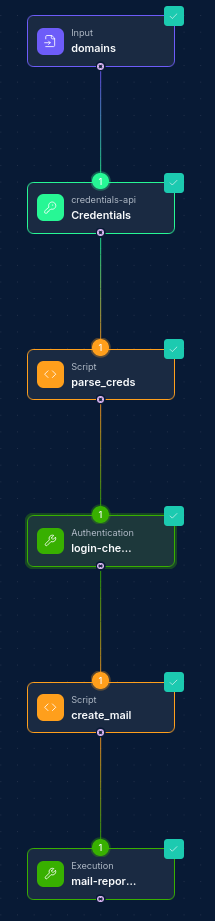
Common Workflow Patterns:
-
Credentials Monitoring Pipeline:
- Schedule Node → Credentials-API Integration Node (search) → Script Node (process results) → Slack Integration Node (notify security team)
-
Credential Testing and Validation:
- Input Node (credential list) → Script Node (test credentials) → Credentials-API Integration Node (addBatchCredentialTry) → Database Node (update status) → Report Node (generate validation report)
-
Domain Risk Assessment:
- Input Node (domain list) → Credentials-API Integration Node (getStats) → Script Node (calculate risk score) → Report Node (generate assessment report)
-
Automated Credential Verification:
- Schedule Node → Credentials-API Integration Node (search recent) → Script Node (validate credentials) → Credentials-API Integration Node (addBatchCredentialTry) → Alert Node (notify on active threats)
-
Breach Detection:
- Trigger Node (new breach detected) → Script Node (extract affected domains) → Credentials-API Integration Node (search) → Filter Node (high-value credentials) → Email Integration Node (alert security team)
-
Credential Visualization:
- Input Node (domains) → Credentials-API Integration Node (getGraph) → Script Node (format for visualization) → Custom Visualization Node
-
Continuous Credential Monitoring:
- Schedule Node → Credentials-API Integration Node (search) → Script Node (test found credentials) → Credentials-API Integration Node (addBatchCredentialTry) → Database Node (track trends) → Dashboard Node (display metrics)
Troubleshooting
| Issue | Resolution |
|---|---|
| Authentication failures | Verify your API key or OAuth credentials are correct. Ensure the domain URL is correctly formatted and includes the protocol (https://). |
| No results found | Check your search parameters. Try broadening your search by removing some filters or expanding date ranges. |
| Rate limiting | The Credentials API may implement rate limiting. If you're hitting limits, consider implementing delays between operations or reducing the frequency of queries. |
| Pagination issues | Ensure your pagination parameters are properly formatted. The page number should start at 1, not 0. |
| Permission errors | Verify that your API key has permission to access the requested data. Some operations may require elevated permissions. |
| Sensitive data handling | Be aware that the API may mask sensitive information like passwords. Ensure your workflows handle partially masked data appropriately. |
Filter Behavior
- Omitted filter and empty array (
[]): both are silently ignored — the filter is not applied and all matching credentials are returned. - Multiple filters: combined with AND logic — a credential must satisfy all specified filters to appear in results.
Best Practices
-
Limit Search Scope: Start with specific, targeted searches to avoid overwhelming result sets. Use domain filters, date ranges, and pagination to manage the volume of data.
-
Handle Sensitive Data Appropriately: The API returns leaked credentials which are sensitive by nature. Ensure your workflows handle this data securely and limit access to authorized personnel only.
-
Use Password Masking by Default: Keep
maskPasswordsset totrue(default) unless you have a specific requirement for full passwords. Only disable masking in secure, controlled environments with proper audit logging. -
Choose Appropriate Response Format: Use
simplifiedResponse: true(default) for most workflows to reduce data transfer and processing overhead. Only request full metadata (simplifiedResponse: false) when you need detailed tracking information, source details, or validation status. -
Implement Proper Access Controls: Use dedicated service accounts with appropriate permissions for automation. Regularly rotate API keys and review access. Restrict access to unmasked credentials to authorized security personnel only.
-
Process Results Efficiently: Use Script Nodes to filter, analyze, and transform credential data to extract actionable insights.
-
Set Up Regular Monitoring: Create scheduled workflows to periodically check for new leaked credentials related to your organization.
-
Integrate with Incident Response: Connect credential findings with your incident response processes for timely mitigation of exposed credentials.
-
Validate Findings: Not all credential matches indicate an actual compromise. Implement validation steps before taking action.
-
Use Resource Locators: When working with domains and other fields, use resource locators to select from available options rather than entering values directly.
-
Implement Error Handling: Add error handling in your workflows to gracefully handle API errors or unexpected response formats.
-
Document Search Criteria: Keep a record of your search criteria and filters for audit and compliance purposes.
-
Audit Unmasked Access: When using
maskPasswords: false, ensure all access is logged and audited. Consider implementing additional authentication or approval steps for workflows that access unmasked credentials. -
Optimize for Performance: For high-volume searches, use simplified responses to reduce payload size and improve workflow performance. Request full metadata only when the additional information is required for your use case. Updated: 2025-12-02