ANY.RUN Integration Guide
Overview
The ANY.RUN integration allows your NINA workflows to connect with the ANY.RUN malware analysis service. This integration enables you to submit files for automated analysis, retrieve detailed reports, manage analysis tasks, and query threat intelligence data.
Status
Currently, we support all Sandbox API operations and the complete Threat Intelligence API, including advanced IoC lookup and search capabilities.
Credential Configuration
Before using the ANY.RUN integration in your workflows, you need to configure credentials for authentication. The NINA platform supports two authentication methods for ANY.RUN:
Authentication Methods
1. API Token (Recommended)
The preferred authentication method using an API key from your ANY.RUN account:
| Field | Description | Example |
|---|---|---|
| API Key | Your ANY.RUN API key | a1b2c3d4e5f6g7h8i9j0... |
| Base URL | ANY.RUN API base URL | https://api.any.run/v1 |
How to get your API Key:
- Log in to your ANY.RUN account
- Go to your profile settings
- Navigate to the API section
- Generate a new API key
- Copy the generated key
2. Basic Authentication
Authentication using your ANY.RUN username and password:
| Field | Description | Example |
|---|---|---|
| Username | Your ANY.RUN username | [email protected] |
| Password | Your ANY.RUN password | password |
| Base URL | ANY.RUN API base URL | https://api.any.run/v1 |
Creating an ANY.RUN Credential
-
Navigate to the Credentials section in NINA
-
Click Add New Credential
-
Fill in the credential details:
- Name: A descriptive name (e.g., "ANY.RUN Production")
- Description: Optional details about the credential's purpose
- Integration Service: Select "ANY.RUN"
- Auth Type: Choose "API Token" or "Basic Auth"
- Fill in the authentication fields based on your selected auth type
-
Click Test Connection to verify credentials
-
Click Save to store the credential
Supported Resources and Operations
The ANY.RUN integration supports the following resources and operations:
Analysis
| Operation | Description |
|---|---|
| Submit Analysis | Submits a file or URL for malware analysis |
| Get History | Retrieves analysis history |
| Get Report | Retrieves a detailed analysis report |
| Add Time | Adds 60 seconds to a running task |
| Stop Task | Stops a running task |
| Delete Task | Deletes a task |
| Get Task Status | Gets the status of a task |
Intelligence
| Operation | Description |
|---|---|
| Get IoC Details | Retrieves detailed information about an indicator of compromise |
| Search IoCs | Search for indicators of compromise |
| Search Threat Intelligence | Searches for threat intelligence data |
Environment
| Operation | Description |
|---|---|
| Get Environments | Gets information about available environment configurations |
User
| Operation | Description |
|---|---|
| Get Limits | Gets information about user's usage limits |
| Get Presets | Gets user's saved presets |
Parameter Merging and Templating
The ANY.RUN integration takes full advantage of NINA's parameter merging and templating capabilities:
Parameter Sources (in order of precedence)
- Node Parameters: Parameters configured directly in the ANY.RUN Integration Node
- Extracted Parameters: Parameters automatically extracted from the input data
- Input Data: The complete input data from upstream nodes
When an ANY.RUN Integration Node executes:
- It combines parameters from all sources
- Node parameters take precedence over extracted parameters
- Template variables within parameters are processed (using
{{variable_name}}syntax) - The combined parameters are used to execute the ANY.RUN operation
Example: Submitting a File for Analysis
Basic File Submission
Below is an example of submitting a file for malware analysis:
Node Configuration:
{
  "integration_service": "anyrun",
  "resource": "analysis",
  "operation": "submitAnalysis",
  "parameters": {
    "obj_type": "file",
    "file": {
      "name": "suspicious_file.exe",
      "data": "BASE64_ENCODED_FILE_CONTENT_HERE"
    },
    "env_os": "windows",
    "env_bitness": 64,
    "env_version": "10",
    "env_type": "complete",
    "opt_network_connect": true,
    "opt_timeout": 60,
    "opt_privacy_type": "bylink"
  }
}
Submitting a URL for Analysis
You can also submit a URL for analysis:
Node Configuration:
{
  "integration_service": "anyrun",
  "resource": "analysis",
  "operation": "submitAnalysis",
  "parameters": {
    "obj_type": "url",
    "obj_url": "https://suspicious-website.example.com",
    "env_os": "windows",
    "env_bitness": 64,
    "env_version": "10",
    "env_type": "complete",
    "opt_network_connect": true,
    "opt_timeout": 60,
    "opt_privacy_type": "bylink"
  }
}
Downloading and Analyzing a File from URL
Submit a URL for the service to download and analyze the file:
Node Configuration:
{
  "integration_service": "anyrun",
  "resource": "analysis",
  "operation": "submitAnalysis",
  "parameters": {
    "obj_type": "download",
    "obj_url": "https://example.com/suspicious-file.exe",
    "env_os": "windows",
    "env_bitness": 64,
    "env_version": "10",
    "env_type": "complete",
    "opt_network_connect": true,
    "opt_timeout": 120,
    "opt_privacy_type": "bylink"
  }
}
Rerunning an Existing Task
Rerun a previous analysis task with the same parameters:
Node Configuration:
{
  "integration_service": "anyrun",
  "resource": "analysis",
  "operation": "submitAnalysis",
  "parameters": {
    "obj_type": "rerun",
    "task_rerun_uuid": "01234567-89ab-cdef-0123-456789abcdef",
    "opt_privacy_type": "bylink"
  }
}
File Submission with Template Variables
You can use template variables to dynamically insert values from input data:
Input Data from Previous Node:
{
  "malware": {
    "filename": "suspicious_payload.exe",
    "filedata": "BASE64_ENCODED_CONTENT_HERE",
    "analysis_timeout": 120
  },
  "analysis_type": "complete"
}
Node Configuration with Template Variables:
{
  "integration_service": "anyrun",
  "resource": "analysis",
  "operation": "submitAnalysis",
  "parameters": {
    "obj_type": "file",
    "file": {
      "name": "{{malware.filename}}",
      "data": "{{malware.filedata}}"
    },
    "env_os": "windows",
    "env_bitness": 64,
    "env_version": "10",
    "env_type": "{{analysis_type}}",
    "opt_network_connect": true,
    "opt_timeout": "{{malware.analysis_timeout}}",
    "opt_privacy_type": "bylink"
  }
}
Example: Retrieving Analysis Reports
Getting Analysis History
Retrieve a list of previous analysis tasks:
Node Configuration:
{
  "integration_service": "anyrun",
  "resource": "analysis",
  "operation": "getHistory",
  "parameters": {
    "limit": 10,
    "offset": 0,
    "additionalFields": {
      "dateFrom": "2023-05-01",
      "dateTo": "2023-05-31",
      "verdicts": ["malicious", "suspicious"]
    }
  }
}
Getting a Detailed Analysis Report
Retrieve a comprehensive report for a specific task:
Node Configuration:
{
  "integration_service": "anyrun",
  "resource": "analysis",
  "operation": "getReport",
  "parameters": {
    "taskId": "01234567-89ab-cdef-0123-456789abcdef"
  }
}
Getting Task Status
Monitor the status of a running analysis task:
Node Configuration:
{
  "integration_service": "anyrun",
  "resource": "analysis",
  "operation": "getTaskStatus",
  "parameters": {
    "taskId": "01234567-89ab-cdef-0123-456789abcdef"
  }
}
Example: Task Management Operations
Adding Time to a Running Task
Add 60 seconds of execution time to an active analysis:
Node Configuration:
{
  "integration_service": "anyrun",
  "resource": "analysis",
  "operation": "addTime",
  "parameters": {
    "taskId": "01234567-89ab-cdef-0123-456789abcdef"
  }
}
Stopping a Task
Stop a running analysis task:
Node Configuration:
{
  "integration_service": "anyrun",
  "resource": "analysis",
  "operation": "stopTask",
  "parameters": {
    "taskId": "01234567-89ab-cdef-0123-456789abcdef"
  }
}
Deleting a Task
Delete an analysis task:
Node Configuration:
{
  "integration_service": "anyrun",
  "resource": "analysis",
  "operation": "deleteTask",
  "parameters": {
    "taskId": "01234567-89ab-cdef-0123-456789abcdef"
  }
}
Example: Threat Intelligence Operations
Searching Threat Intelligence
Search for threat intelligence data based on various criteria:
Node Configuration:
{
  "integration_service": "anyrun",
  "resource": "intel",
  "operation": "searchThreatIntelligence",
  "parameters": {
    "query": "Emotet",
    "startDate": "2023-01-01",
    "endDate": "2023-12-31",
    "threatLevel": "malicious",
    "taskType": "file"
  }
}
Advanced Threat Intelligence Query
For more targeted searches:
Node Configuration:
{
  "integration_service": "anyrun",
  "resource": "intel",
  "operation": "searchThreatIntelligence",
  "parameters": {
    "query": "Emotet AND Trickbot",
    "sha256": "e3b0c44298fc1c149afbf4c8996fb92427ae41e4649b934ca495991b7852b855",
    "threatName": "Emotet",
    "threatLevel": "malicious"
  }
}
Getting IoC Details
Retrieve detailed information about a specific indicator of compromise:
Node Configuration:
{
  "integration_service": "anyrun",
  "resource": "intel",
  "operation": "getIoCDetails",
  "parameters": {
    "iocValue": "e3b0c44298fc1c149afbf4c8996fb92427ae41e4649b934ca495991b7852b855",
    "type": "hash"
  }
}
Searching for IoCs
Search for indicators of compromise with filtering options:
Node Configuration:
{
  "integration_service": "anyrun",
  "resource": "intel",
  "operation": "searchIoCs",
  "parameters": {
    "query": "malware.exe",
    "limit": 20,
    "filter": {
      "type": "hash",
      "maliciousOnly": true
    }
  }
}
IP Address IoC Lookup:
{
  "integration_service": "anyrun",
  "resource": "intel",
  "operation": "getIoCDetails",
  "parameters": {
    "iocValue": "192.168.1.100",
    "type": "ip"
  }
}
Domain IoC Lookup:
{
  "integration_service": "anyrun",
  "resource": "intel",
  "operation": "getIoCDetails",
  "parameters": {
    "iocValue": "suspicious-domain.com",
    "type": "domain"
  }
}
Example: Environment and User Operations
Getting Available Environments
Retrieve information about the available analysis environments:
Node Configuration:
{
  "integration_service": "anyrun",
  "resource": "environment",
  "operation": "getEnvironments",
  "parameters": {}
}
Getting User Limits
Retrieve information about your account usage limits:
Node Configuration:
{
  "integration_service": "anyrun",
  "resource": "user",
  "operation": "getLimits",
  "parameters": {}
}
Getting User Presets
Retrieve your saved analysis presets:
Node Configuration:
{
  "integration_service": "anyrun",
  "resource": "user",
  "operation": "getPresets",
  "parameters": {}
}
Integration in Workflow Context
The ANY.RUN integration is particularly powerful when combined with other nodes in a workflow:
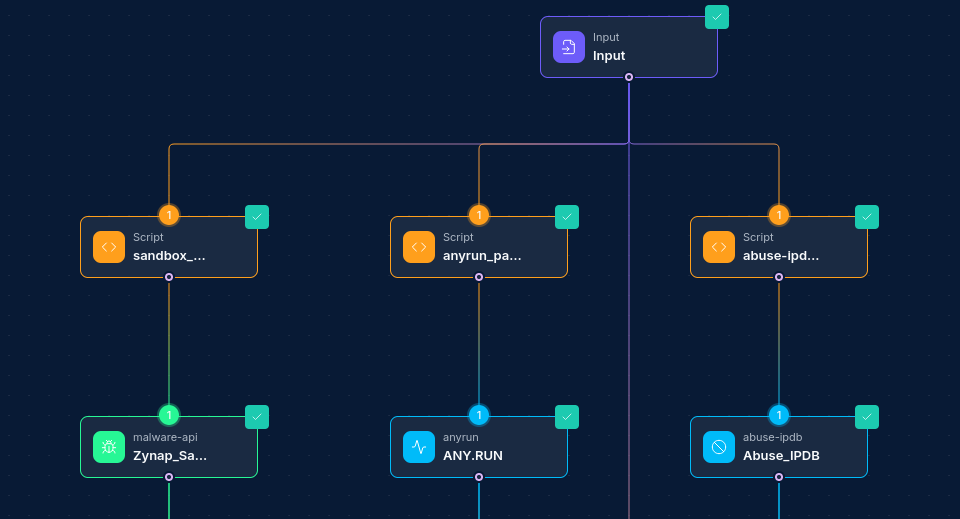
Common Workflow Patterns:
-
Email Attachment Analysis:
- Email Integration Node → Script Node (extract attachment) → ANY.RUN Integration Node (analysis) → If/Else Node (check verdict) → Slack/Jira Node (notification)
-
URL Analysis Pipeline:
- Webhook Node (receive URL) → ANY.RUN Integration Node (URL analysis) → Script Node (process results) → Report Node (generate report)
-
Batch File Analysis:
- S3/Storage Node (retrieve files) → Script Node (prepare batch) → ANY.RUN Integration Node (analysis) → Database Node (store results)
-
Continuous Threat Intelligence:
- Schedule Node → ANY.RUN Integration Node (search intelligence) → Script Node (filter/enrich) → Threat Intel Platform Node
Troubleshooting
| Issue | Resolution |
|---|---|
| Authentication failures | Verify your credential configuration: check API key/username/password and ensure they are current. API keys may expire or be revoked. |
| "Task not found" errors | Verify the taskId is correct and that you have permission to access the task. Tasks may be deleted after a certain retention period. |
| Task submission failures | Check file size limits (typically 100MB). Ensure the file format is supported. Verify your account has sufficient analysis credits remaining. |
| Analysis timeouts | The default timeout is 60 seconds. For complex malware, increase the opt_timeout parameter (max 660 seconds). |
| Rate limiting | If you hit rate limits, implement delays between operations or reduce frequency. |
| Parameter validation errors | Check the environment parameters match the supported values (e.g., env_os must be "windows" or "linux", env_bitness must be 32 or 64). |
| Task stuck in queue | During high demand periods, tasks may wait in a queue. Use the getTaskStatus operation to monitor progress. |
Best Practices
-
Use API Token Authentication: API token authentication is more secure than basic authentication and should be preferred.
-
Optimize Analysis Parameters: Choose the appropriate environment parameters based on the type of file or URL being analyzed.
-
Leverage Template Variables: Use
{{variable_name}}syntax to dynamically insert values from input data. -
Consider Privacy Settings: The
opt_privacy_typeparameter controls who can access the analysis. Use "bylink" or more restrictive options for sensitive files. -
Monitor Task Status: For long-running analyses, use the getTaskStatus operation to monitor progress rather than repeatedly fetching the report.
-
Handle Task IDs Carefully: Store task IDs returned from submissions as they're needed for all other operations.
-
Process Reports Thoroughly: Analysis reports contain extensive data. Use Script Nodes to extract and process the most relevant information.
-
Implement Error Handling: Add error handling for network issues, rate limiting, and other API errors.
-
Consider Retention Policies: ANY.RUN may delete tasks after a certain period. If long-term storage is needed, save reports in your own storage.
-
Respect API Limitations: Monitor your API usage and respect rate limits to avoid service disruptions. Updated: 2025-12-02