Credit Cards API Integration Guide
Overview
The Credit Cards API integration allows your NINA workflows to connect with the internal Credit Cards API service for searching and retrieving credit card information. This integration enables security teams to search for exposed credit card data, download credit card datasets, and analyze financial data breaches.
This is an internal integration service designed for fraud detection workflows, breach analysis operations, and financial security investigations within your organization's security infrastructure. It provides a streamlined way to identify potentially compromised credit cards, track financial data exposures, and analyze patterns in leaked financial information.
Status
The integration supports the following core functionalities:
- Credit Card Search: Search for credit cards using various criteria including BIN codes, expiration dates, and geographic filters
- CSV Export: Download credit card data in CSV format for analysis and reporting
- Advanced Filtering: Filter by card schemes, bank names, country codes, and temporal criteria
- Dynamic Resource Selection: Auto-populate BIN codes and country codes from existing data
Credential Configuration
Before using the Credit Cards API integration in your workflows, you need to configure credentials for authentication.
Authentication Method
The Credit Cards API integration uses client credentials authentication:
Client Credentials Authentication
Authentication using client ID and secret:
| Field | Description | Example |
|---|---|---|
| Client ID | Client ID for authentication | client_123456789 |
| Secret | Secret for authentication | secret_abcdef123456789 |
How to get your Client Credentials:
- Contact your organization's security team or administrator for access to the Credit Cards API
- Request client credentials for the service
- Obtain the client ID and secret for authentication
- Ensure your client has the necessary permissions for credit card data access
Note: This is an internal integration service typically used within your organization's financial security infrastructure. Access is restricted to authorized personnel only.
Creating a Credit Cards API Credential
-
Navigate to the Credentials section in NINA
-
Click Add New Credential
-
Fill in the credential details:
- Name: A descriptive name (e.g., "Credit Cards API Production")
- Description: Optional details about the credential's purpose
- Integration Service: Select "Credit Cards API"
- Client ID: Enter your client ID
- Secret: Enter your client secret
-
Click Test Connection to verify credentials
-
Click Save to store the credential
Supported Resources and Operations
The Credit Cards API integration supports the following resources and operations:
Cards
| Operation | Description |
|---|---|
| Search Cards | Search for credit cards based on various criteria including BIN codes, dates, schemes, and geographic filters |
| Download Cards CSV | Download credit cards data as CSV based on search criteria for offline analysis |
Parameter Merging
The Credit Cards API integration takes advantage of NINA's parameter merging capabilities:
Parameter Sources (in order of precedence)
- Node Parameters: Parameters configured directly in the Credit Cards API Integration Node
- Extracted Parameters: Parameters automatically extracted from the input data
- Input Data: The complete input data from upstream nodes
When a Credit Cards API Integration Node executes:
- It combines parameters from all sources
- Node parameters take precedence over extracted parameters
- The combined parameters are used to execute the Credit Cards API operation
Example: Basic Credit Card Search
Simple Card Search
Below is an example of searching for credit cards with basic criteria:
Node Configuration:
{
  "integration_service": "credit-cards-api",
  "resource": "cards",
  "operation": "search",
  "parameters": {
    "pagination": {
      "page": 1,
      "pageSize": 50
    }
  }
}
Search by Card Scheme
Search for specific card types (Visa, Mastercard, etc.):
Node Configuration:
{
  "integration_service": "credit-cards-api",
  "resource": "cards",
  "operation": "search",
  "parameters": {
    "schemes": ["visa", "mastercard"],
    "pagination": {
      "page": 1,
      "pageSize": 100
    }
  }
}
Search by Country
Search for cards from specific countries:
Node Configuration:
{
  "integration_service": "credit-cards-api",
  "resource": "cards",
  "operation": "search",
  "parameters": {
    "countryCodes": {
      "mode": "list",
      "value": ["US", "CA", "GB"]
    },
    "pagination": {
      "page": 1,
      "pageSize": 50
    }
  }
}
Example: Advanced Filtering
Date Range Filtering
Search for cards within specific date ranges:
Node Configuration:
{
  "integration_service": "credit-cards-api",
  "resource": "cards",
  "operation": "search",
  "parameters": {
    "startExpirationDate": "2024-01-01T00:00:00Z",
    "endExpirationDate": "2024-12-31T23:59:59Z",
    "startInsertionDate": "2023-01-01T00:00:00Z",
    "endInsertionDate": "2023-12-31T23:59:59Z",
    "pagination": {
      "page": 1,
      "pageSize": 50
    }
  }
}
Recent Data Search
Search for recently added credit card data:
Node Configuration:
{
  "integration_service": "credit-cards-api",
  "resource": "cards",
  "operation": "search",
  "parameters": {
    "insertedAtLastSeconds": 604800,
    "sort": "insertion_date desc",
    "pagination": {
      "page": 1,
      "pageSize": 25
    }
  }
}
BIN Code Filtering
Search for cards with specific BIN (Bank Identification Number) codes:
Node Configuration:
{
  "integration_service": "credit-cards-api",
  "resource": "cards",
  "operation": "search",
  "parameters": {
    "binCodes": {
      "mode": "list",
      "value": ["123456", "456789", "789012"]
    },
    "pagination": {
      "page": 1,
      "pageSize": 50
    }
  }
}
Bank-Specific Search
Search for cards from specific banks:
Node Configuration:
{
  "integration_service": "credit-cards-api",
  "resource": "cards",
  "operation": "search",
  "parameters": {
    "bankNames": ["Chase Bank", "Bank of America", "Wells Fargo"],
    "schemes": ["visa"],
    "pagination": {
      "page": 1,
      "pageSize": 50
    }
  }
}
Example: Comprehensive Search Criteria
Multi-Criteria Search
Combine multiple search criteria for targeted results:
Node Configuration:
{
  "integration_service": "credit-cards-api",
  "resource": "cards",
  "operation": "search",
  "parameters": {
    "schemes": ["visa", "mastercard"],
    "countryCodes": {
      "mode": "list",
      "value": ["US", "CA"]
    },
    "startExpirationDate": "2024-01-01T00:00:00Z",
    "endExpirationDate": "2025-12-31T23:59:59Z",
    "insertedAtLastSeconds": 2592000,
    "sort": "expiration_date desc, insertion_date asc",
    "pagination": {
      "page": 1,
      "pageSize": 100
    }
  }
}
Tagged Data Search
Search for cards with specific tags:
Node Configuration:
{
  "integration_service": "credit-cards-api",
  "resource": "cards",
  "operation": "search",
  "parameters": {
    "tagIds": [101, 102, 103],
    "schemes": ["visa"],
    "pagination": {
      "page": 1,
      "pageSize": 50
    }
  }
}
Example: Data Export Operations
CSV Download
Download credit card data for offline analysis:
Node Configuration:
{
  "integration_service": "credit-cards-api",
  "resource": "cards",
  "operation": "download",
  "parameters": {
    "schemes": ["visa", "mastercard"],
    "countryCodes": {
      "mode": "list",
      "value": ["US"]
    },
    "startInsertionDate": "2024-01-01T00:00:00Z",
    "endInsertionDate": "2024-03-31T23:59:59Z",
    "sort": "insertion_date desc",
    "pagination": {
      "page": 1,
      "pageSize": 1000
    }
  }
}
Large Dataset Export
Export large datasets with pagination:
Node Configuration:
{
  "integration_service": "credit-cards-api",
  "resource": "cards",
  "operation": "download",
  "parameters": {
    "insertedAtLastSeconds": 86400,
    "sort": "insertion_date desc",
    "pagination": {
      "page": 1,
      "pageSize": 5000
    }
  }
}
Example: Fraud Detection Workflow
Complete Fraud Analysis Workflow
Here's an example of a comprehensive fraud detection workflow using the Credit Cards API:
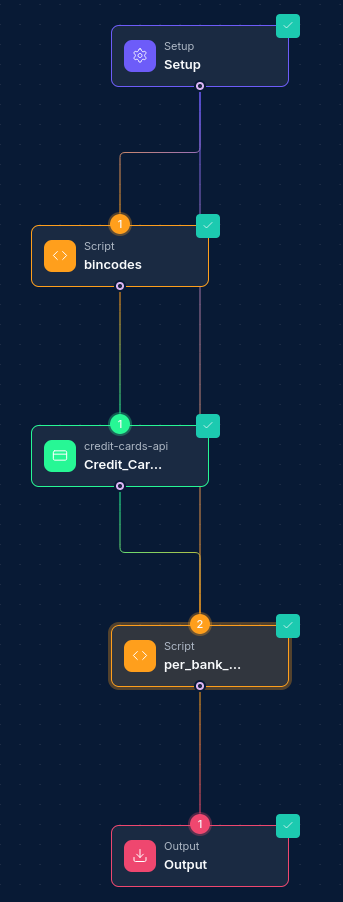
- Recent Data Ingestion: Search for recently added credit card data
- Geographic Analysis: Filter by specific countries or regions of interest
- Bank Analysis: Identify patterns across different banks and card schemes
- Export for Analysis: Download filtered datasets for detailed offline analysis
- Report Generation: Compile findings into comprehensive fraud reports
This workflow enables security teams to rapidly identify and analyze potentially fraudulent credit card activities.
Example: Parameter Extraction
Using Automatic Parameter Extraction
The Credit Cards API integration can automatically extract parameters from input data. For example, if your upstream node outputs data containing card information, the integration will automatically use relevant fields for the API calls.
Input Data from Breach Analysis Node:
{
  "breach_data": {
    "affected_countries": ["US", "CA"],
    "card_schemes": ["visa", "mastercard"],
    "suspected_banks": ["Chase Bank", "Bank of America"],
    "breach_date": "2024-01-15T00:00:00Z"
  }
}
Node Configuration for Automatic Extraction:
{
  "integration_service": "credit-cards-api",
  "resource": "cards",
  "operation": "search",
  "parameters": {
    "countryCodes": {
      "mode": "list",
      "value": ["US", "CA"]
    },
    "schemes": ["visa", "mastercard"],
    "bankNames": ["Chase Bank", "Bank of America"],
    "startInsertionDate": "2024-01-15T00:00:00Z",
    "pagination": {
      "page": 1,
      "pageSize": 100
    }
  }
}
Dynamic Resource Selection
BIN Code Selection
The Credit Cards API integration provides dynamic BIN code selection:
- List Mode: Select from available BIN codes using a searchable dropdown
- Manual Entry: Enter BIN codes directly for specific searches
Using List Mode:
{
  "integration_service": "credit-cards-api",
  "resource": "cards",
  "operation": "search",
  "parameters": {
    "binCodes": {
      "mode": "list",
      "value": ["obtained_from_dropdown"]
    }
  }
}
Using Manual Entry:
{
  "integration_service": "credit-cards-api",
  "resource": "cards",
  "operation": "search",
  "parameters": {
    "binCodes": {
      "mode": "id",
      "value": "123456"
    }
  }
}
Country Code Selection
Similar dynamic selection is available for country codes:
Using List Mode:
{
  "integration_service": "credit-cards-api",
  "resource": "cards",
  "operation": "search",
  "parameters": {
    "countryCodes": {
      "mode": "list",
      "value": ["selected_from_dropdown"]
    }
  }
}
Using Manual Entry:
{
  "integration_service": "credit-cards-api",
  "resource": "cards",
  "operation": "search",
  "parameters": {
    "countryCodes": {
      "mode": "id",
      "value": "US"
    }
  }
}
Filter Behavior
- Omitted filter and empty array (
[]): both are silently ignored — the filter is not applied and all matching cards are returned. - Multiple filters: combined with AND logic — a card must satisfy all specified filters to appear in results.
Best Practices
Optimization Tips
- Pagination Strategy: Use appropriate page sizes to balance performance and data completeness
- Date Range Filtering: Use specific date ranges to limit result sets and improve query performance
- Country and Scheme Filtering: Apply geographic and scheme filters early to reduce data volume
- Sort Optimization: Use sorting to prioritize the most relevant results first
Security Considerations
- Data Sensitivity: Credit card data is highly sensitive - ensure appropriate security measures
- Access Control: Implement strict access controls for credit card information
- Data Retention: Follow data retention policies and regulations for financial data
- Audit Logging: Maintain detailed logs of all credit card data access and operations
Performance Considerations
- Batch Processing: For large datasets, consider breaking queries into smaller batches
- Time-based Filtering: Use
insertedAtLastSecondsfor recent data to improve performance - Export Limitations: Be aware of API limits when downloading large datasets
Troubleshooting
| Issue | Resolution |
|---|---|
| Authentication failures | Verify client ID and secret are correct and have proper permissions |
| No results returned | Check filter criteria and ensure data exists matching the parameters |
| Large result sets timing out | Reduce page size or add more specific filtering criteria |
| Invalid date formats | Ensure dates are in ISO 8601 format (YYYY-MM-DDTHH:MM:SSZ) |
| BIN code not found | Verify BIN codes are valid and exist in the system |
| Country code errors | Use standard ISO country codes (e.g., "US", "CA", "GB") |
| CSV download failures | Check pagination limits and reduce dataset size if necessary |
| Parameter extraction errors | Verify input data contains expected fields in the correct format |
Compliance and Legal Considerations
Data Protection
- PCI DSS Compliance: Ensure all credit card data handling complies with PCI DSS requirements
- Data Encryption: All credit card data should be encrypted in transit and at rest
- Access Logging: Maintain comprehensive logs of all access to credit card information
Regional Regulations
- GDPR: For European data, ensure compliance with GDPR requirements
- CCPA: For California residents' data, follow CCPA guidelines
- Local Laws: Comply with local financial data protection laws in your jurisdiction
Usage Guidelines
- Legitimate Purpose: Only access credit card data for legitimate security and fraud prevention purposes
- Data Minimization: Only retrieve the minimum data necessary for your analysis
- Retention Limits: Follow organizational and legal data retention policies Updated: 2025-12-02