Forums API Integration Guide
Overview
The Forums API integration allows your NINA workflows to seamlessly connect with the internal forum services to search across threads and posts for security intelligence gathering, threat monitoring, and research activities. This integration enables security teams to monitor underground forums, track threat actor discussions, and gather intelligence from various forum platforms.
This is an internal integration service designed for security teams to access forum data within your organization's threat intelligence infrastructure.
The integration is particularly valuable for threat intelligence workflows, cybercrime investigations, and security research operations where forum monitoring is essential for understanding emerging threats and tracking malicious activities.
Status
Currently, the integration supports the following core functionality:
- Keyword Search: Search across threads and posts in forums using specific keywords
- Forum Filtering: Target specific forum types or search across all available forums
- Result Limiting: Control the number of results returned for efficient processing
Note: This integration is currently in a focused implementation phase, providing essential search capabilities. Additional functionality for managing users, posts, and threads may be available in future releases.
Credential Configuration
Before using the Forums API integration in your workflows, you need to configure the connection settings. This integration uses no authentication but requires a base URL configuration.
Authentication Method
The Forums API integration uses no authentication:
No Authentication Required
Simple connection configuration using only a base URL:
| Field | Description | Example |
|---|---|---|
| Base URL | Base URL for the Forums API service | https://forums-api.internal.company.com |
How to obtain your Base URL:
- Contact your organization's security team or administrator for access to the Forums API
- Request the internal base URL for the Forums API service
- Ensure you have network access to the internal service
- Verify the URL format includes the protocol (https://)
Note: This is an internal integration service typically used within your organization's security infrastructure. Access is controlled at the network level rather than through API authentication.
Creating a Forums API Configuration
-
Navigate to the Credentials section in NINA
-
Click Add New Credential
-
Fill in the credential details:
- Name: A descriptive name (e.g., "Forums API Internal")
- Description: Optional details about the configuration's purpose
- Integration Service: Select "Forums API"
- Base URL: Enter the internal Forums API base URL
-
Click Test Connection to verify connectivity
-
Click Save to store the configuration
Supported Resources and Operations
The Forums API integration supports the following resources and operations:
Search
| Operation | Description |
|---|---|
| Search by Keyword | Search across threads and posts using specific keywords |
Parameter Merging and Templating
The Forums API integration takes full advantage of NINA's parameter merging and templating capabilities:
Parameter Sources (in order of precedence)
- Node Parameters: Parameters configured directly in the Forums API Integration Node
- Extracted Parameters: Parameters automatically extracted from the input data
- Input Data: The complete input data from upstream nodes
When a Forums API Integration Node executes:
- It combines parameters from all sources
- Node parameters take precedence over extracted parameters
- The combined parameters are used to execute the Forums API operation
Example: Basic Keyword Search
Simple Keyword Search
Below is an example of searching for specific keywords across all forums:
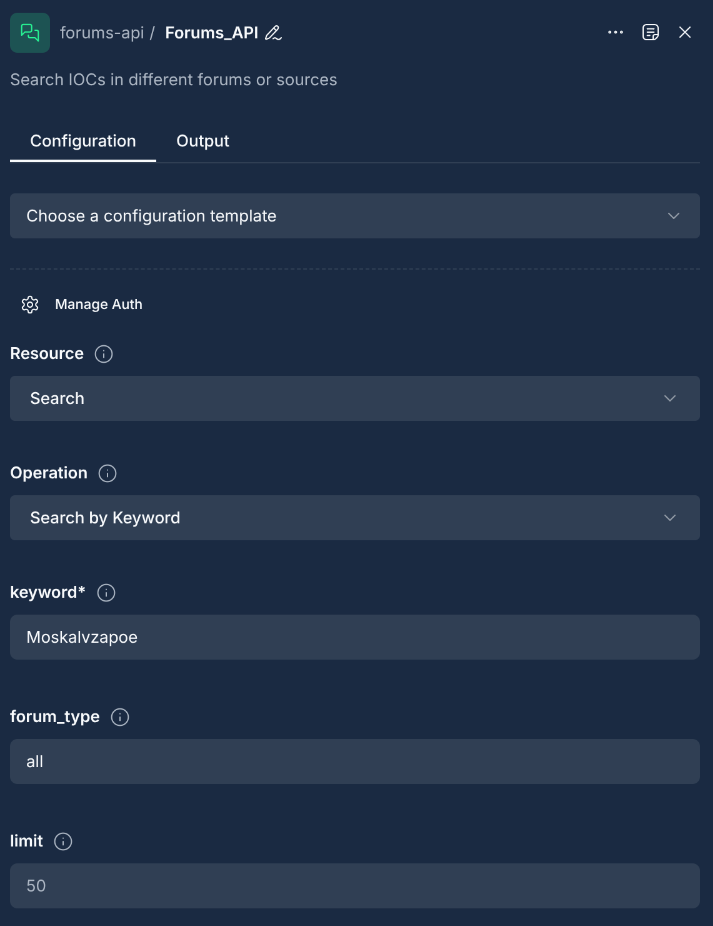
Node Configuration:
{
  "integration_service": "forums-api",
  "resource": "search",
  "operation": "searchKeyword",
  "parameters": {
    "keyword": "malware",
    "limit": 50
  }
}
Search with Forum Type Filter
Search for keywords within a specific forum type:
Node Configuration:
{
  "integration_service": "forums-api",
  "resource": "search",
  "operation": "searchKeyword",
  "parameters": {
    "keyword": "ransomware",
    "forum_type": "cybercrime",
    "limit": 100
  }
}
Search Across All Forums
Search for keywords across all available forums:
Node Configuration:
{
  "integration_service": "forums-api",
  "resource": "search",
  "operation": "searchKeyword",
  "parameters": {
    "keyword": "APT29",
    "forum_type": "all",
    "limit": 200
  }
}
Example: Advanced Search with Template Variables
Using Template Variables for Dynamic Searches
You can use template variables to dynamically insert values from input data:
Input Data from Previous Node:
{
  "threat_indicators": {
    "primary_keyword": "banking trojan",
    "secondary_keywords": ["credential theft", "financial malware"],
    "target_forums": ["underground", "darkweb"]
  },
  "search_config": {
    "max_results": 75,
    "priority": "high"
  }
}
Node Configuration with Template Variables:
{
  "integration_service": "forums-api",
  "resource": "search",
  "operation": "searchKeyword",
  "parameters": {
    "keyword": "{{threat_indicators.primary_keyword}}",
    "forum_type": "{{threat_indicators.target_forums[0]}}",
    "limit": "{{search_config.max_results}}"
  }
}
Multi-Step Search Workflow
For comprehensive threat intelligence gathering, you can create multiple search nodes:
First Search - Primary Threat:
{
  "integration_service": "forums-api",
  "resource": "search",
  "operation": "searchKeyword",
  "parameters": {
    "keyword": "{{threat_indicators.primary_keyword}}",
    "forum_type": "all",
    "limit": 100
  }
}
Second Search - Secondary Indicators:
{
  "integration_service": "forums-api",
  "resource": "search",
  "operation": "searchKeyword",
  "parameters": {
    "keyword": "{{threat_indicators.secondary_keywords[0]}}",
    "forum_type": "cybercrime",
    "limit": 50
  }
}
Example: Threat Intelligence Monitoring
Monitoring Emerging Threats
Set up automated monitoring for specific threat categories:
Input Data from Threat Feed:
{
  "monitoring_config": {
    "threat_categories": ["zero-day", "exploit kit", "credential dump"],
    "target_forums": ["hacker", "underground", "darkweb"],
    "alert_threshold": 10
  },
  "search_parameters": {
    "max_results_per_search": 200,
    "priority_level": "critical"
  }
}
Node Configuration for Threat Monitoring:
{
  "integration_service": "forums-api",
  "resource": "search",
  "operation": "searchKeyword",
  "parameters": {
    "keyword": "{{monitoring_config.threat_categories[0]}}",
    "forum_type": "{{monitoring_config.target_forums[0]}}",
    "limit": "{{search_parameters.max_results_per_search}}"
  }
}
Tracking Specific Threat Actors
Monitor discussions related to known threat actors:
Node Configuration:
{
  "integration_service": "forums-api",
  "resource": "search",
  "operation": "searchKeyword",
  "parameters": {
    "keyword": "Lazarus Group",
    "forum_type": "all",
    "limit": 150
  }
}
Monitoring Cryptocurrency-Related Threats
Track cryptocurrency-related malicious activities:
Node Configuration:
{
  "integration_service": "forums-api",
  "resource": "search",
  "operation": "searchKeyword",
  "parameters": {
    "keyword": "crypto stealer",
    "forum_type": "cybercrime",
    "limit": 100
  }
}
Example: Automatic Parameter Extraction
Using Automatic Parameter Extraction
When an upstream node provides Forums API-specific data, the Integration Node can automatically extract and use it:
Input Data from Previous Node:
{
  "keyword": "data breach",
  "forum_type": "hacker",
  "limit": 80,
  "search_context": {
    "investigation_id": "INV-2024-001",
    "priority": "high"
  }
}
Node Configuration (Minimal):
{
  "integration_service": "forums-api",
  "resource": "search",
  "operation": "searchKeyword",
  "parameters": {
    "additional_context": "Investigation {{search_context.investigation_id}}"
  }
}
Final Merged Parameters:
The integration automatically extracts relevant fields from the input data:
{
  "keyword": "data breach",
  "forum_type": "hacker",
  "limit": 80,
  "additional_context": "Investigation INV-2024-001"
}
Search Parameters and Options
Required Parameters
| Parameter | Type | Description |
|---|---|---|
| keyword | string | The search keyword or phrase to look for in forum threads and posts |
Optional Parameters
| Parameter | Type | Description | Default |
|---|---|---|---|
| forum_type | string | Specific forum type to search in, or "all" for all forums | all |
| limit | number | Maximum number of results to return (1-1000) | 50 |
Forum Type Options
The forum_type parameter supports various forum categories:
- all: Search across all available forums
- cybercrime: Focus on cybercrime-related forums
- hacker: General hacking and security forums
- underground: Underground and darkweb forums
- marketplace: Criminal marketplace forums
- technical: Technical discussion forums
- general: General discussion forums
Result Limits
The limit parameter controls the number of results returned:
- Minimum: 1 result
- Maximum: 1000 results
- Default: 50 results
- Recommended: 100-200 for balanced performance and coverage
Best Practices
Search Strategy
- Use Specific Keywords: Choose precise and relevant keywords for better search results
- Combine Multiple Searches: Use multiple search nodes for comprehensive coverage
- Target Appropriate Forums: Select forum types that align with your threat intelligence needs
- Set Reasonable Limits: Balance between comprehensive coverage and performance
- Monitor Continuously: Implement regular searches for ongoing threat monitoring
Performance Optimization
- Batch Processing: Use multiple parallel searches for different keywords
- Result Filtering: Apply appropriate limits to avoid overwhelming downstream processes
- Template Usage: Leverage template variables for dynamic and flexible searches
- Parameter Extraction: Use automatic parameter extraction for streamlined workflows
- Error Handling: Implement proper error handling for network and API issues
Security Considerations
- Data Sensitivity: Be aware that forum data may contain sensitive or illegal content
- Access Control: Ensure appropriate access controls for forum intelligence data
- Data Retention: Implement proper data retention policies for forum search results
- Legal Compliance: Ensure compliance with applicable laws and regulations
- Ethical Usage: Use forum monitoring capabilities responsibly and ethically
Workflow Design
- Modular Approach: Design workflows with modular search components
- Result Validation: Implement validation steps for search results
- Alert Thresholds: Set appropriate alert thresholds for actionable intelligence
- Documentation: Document search strategies and keyword selections
- Regular Review: Regularly review and update search parameters and strategies
Troubleshooting
| Issue | Resolution |
|---|---|
| Connection timeout | Verify the base URL is correct and the internal Forums API service is accessible from your network |
| Service unavailable | Check that the internal Forums API service is running and accessible within your organization's infrastructure |
| Invalid base URL | Ensure the base URL includes the correct protocol (https://) and points to the internal service endpoint |
| Network connectivity issues | Verify network connectivity to the internal service and check firewall settings for internal service access |
| "keyword is required" errors | Ensure the keyword parameter is provided and is a non-empty string |
| Empty search results | Check keyword spelling and try broader search terms; verify the service has indexed forum data |
| Limit parameter errors | Ensure limit is a number between 1 and 1000 |
| Forum type not found | Verify the forum_type parameter matches available forum categories in the internal service |
| API response errors | Verify the internal Forums API service is running and the base URL configuration is correct |
| Parameter extraction failures | Check that input data contains expected fields for automatic extraction |
Response Format
The Forums API returns structured JSON responses containing search results. Example response:
{
  "results": [
    {
      "id": "thread_12345",
      "title": "Discussion about malware analysis",
      "content": "This thread discusses various malware analysis techniques...",
      "author": "security_researcher",
      "forum_type": "technical",
      "created_at": "2024-01-15T10:30:00Z",
      "updated_at": "2024-01-15T15:45:00Z",
      "post_count": 25,
      "view_count": 150,
      "tags": ["malware", "analysis", "security"],
      "relevance_score": 0.85
    }
  ],
  "metadata": {
    "total_results": 1,
    "search_keyword": "malware",
    "forum_type": "technical",
    "limit": 50,
    "search_time_ms": 245
  }
}
Integration with Other Services
The Forums API integration works seamlessly with other NINA integrations within your organization's security infrastructure:
Internal Security Services
- EASM API: Cross-reference forum discussions with external attack surface findings
- Credentials API: Correlate forum mentions with compromised credential data
- Credit Cards API: Monitor forum discussions about financial data breaches
- CVEs API: Track forum discussions about specific vulnerabilities
Threat Intelligence Enrichment
- Threat Actors API: Cross-reference forum mentions with known threat actors
- Malware Analysis: Submit suspicious files mentioned in forums for analysis
- IOC Databases: Validate indicators of compromise found in forum discussions
Alerting and Reporting
- Slack Integration: Send forum alerts to security teams
- Email Notifications: Generate email reports for forum intelligence
- SIEM Integration: Feed forum data into security information and event management systems
Data Processing
- Script Nodes: Process and analyze forum content for keywords and patterns
- Filter Nodes: Apply custom logic to prioritize forum findings
- Database Nodes: Store forum intelligence data for historical analysis
Note: As an internal service, the Forums API integrates seamlessly with your organization's existing security tools and workflows, providing a unified approach to threat intelligence gathering. Updated: 2026-01-15