Loop Node Guide
Overview
The Loop Node runs a sub-section of your workflow — the "loop body" — multiple times in sequence. Unlike a regular linear flow where every node executes exactly once, a Loop Node lets the same set of downstream nodes process a different value on each pass. It supports two iteration modes: foreach, which runs once for each line of upstream input, and while, which keeps running until a condition you define is satisfied or a safety cap is reached.
Use Cases
- Per-target processing: run a scan, lookup, or AI analysis once for each domain, IP, or asset in an upstream list
- Polling external systems: repeatedly call an asynchronous API endpoint until it reports the work is complete
- Bulk data enrichment: walk through a list of records and enrich each one with downstream nodes
- Retry and refine loops: keep generating or transforming data until the result matches a quality condition
- Page-by-page collection: iterate through paginated API results until the response indicates no more pages
- Per-row classification: feed each line of a dataset into a Scripting Agent or AI node for classification
How the Loop Node Works
The Loop Node executes its body in a strictly serial fashion — iteration N+1 does not begin until every node inside iteration N has reached a terminal state (complete, failed, or skipped). The mechanics differ slightly between the two iteration modes:
Foreach mode
- Read input: the loop reads its upstream node's output and splits it into lines
- Filter lines: blank and whitespace-only lines are discarded; each remaining line is trimmed
- Iterate: the loop runs the body once per line, passing that line as the iteration value
- Aggregate: when every line has been processed, the loop emits a summary manifest and the workflow continues
While mode
- Initialize: the loop computes a placeholder value for each potential iteration (the iteration index as a string)
- Iterate: the loop runs the body, then evaluates your
exit_conditionagainst the feedback node's JSON output - Decide: if the condition is
true, the loop stops withexit_reason = condition_met; otherwise the next iteration begins - Cap: if the loop reaches
max_iterationswithout the condition matching, it stops withexit_reason = max_iterations
Note — iterations run serially. All body nodes — including asynchronous nodes such as Operation, Script, Scripting Agent, and Integration nodes — are fully awaited before the next iteration starts. A loop body that takes 30 seconds to run will take roughly N × 30 seconds for N iterations.
Creating a Loop Node
Basic Setup
- Drag a Loop Node from the node palette onto your workflow canvas
- Choose
foreachorwhileas the Loop Type - For
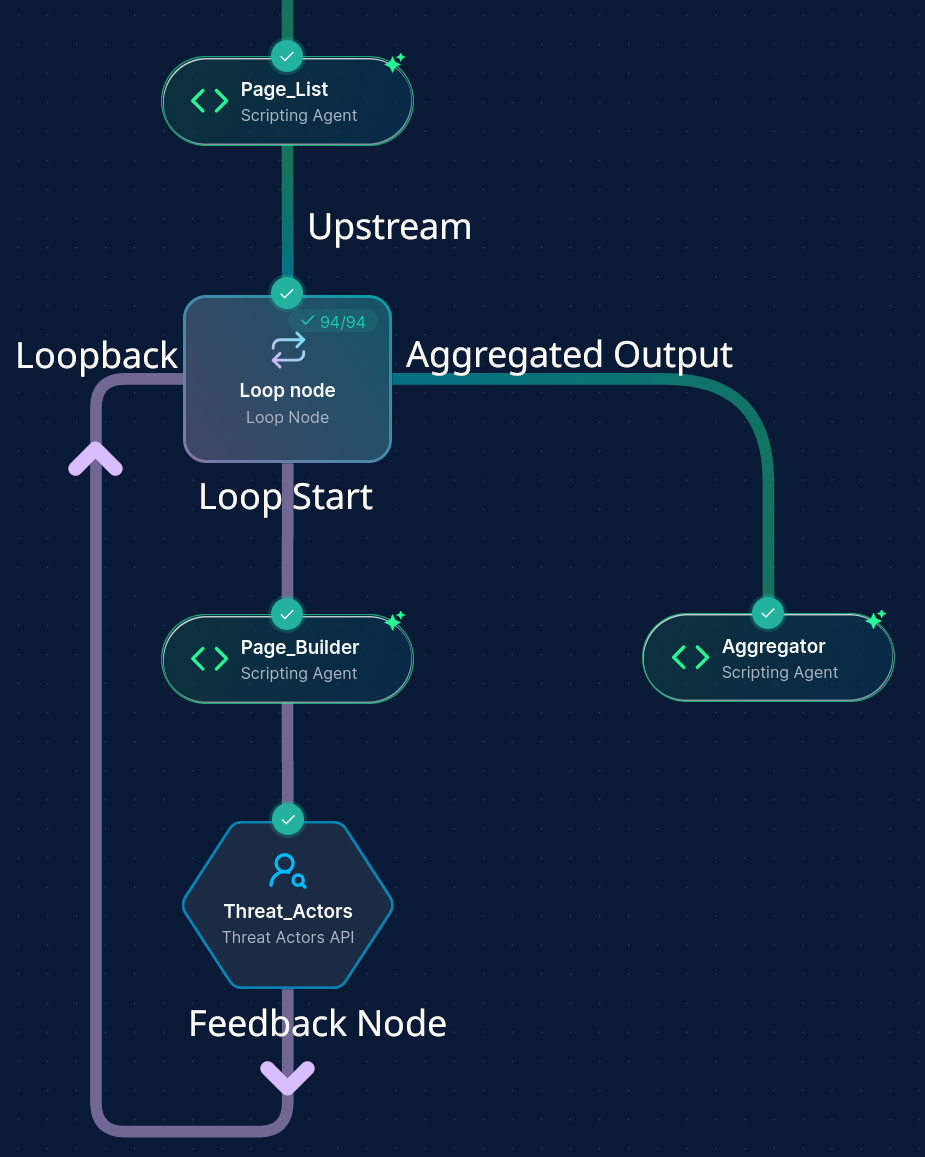
foreach: connect an upstream node whose output is one entry per line. Forwhile: configure Max Iterations and the Exit Condition - Build the loop body: connect the Loop Node to the first body node with a loop_start edge
- Close the loop: connect the last body node (the "feedback node") back to the Loop Node with a loop_end edge
- Optionally configure Error Handling to control what happens when an iteration fails
Configuration Options
Node Properties
| Property | Description |
|---|---|
| Name | A descriptive name for the node |
| Loop Type | foreach (iterate over lines of input) or while (poll until a condition is met) |
| Error Handling | stop (default behaviour — halt the loop on the first iteration failure) or continue (skip failed iterations and proceed) |
Loop Behavior
| Property | Applies To | Description |
|---|---|---|
| Max Iterations | while only | Required. Hard cap on the number of iterations. Must be between 1 and 100. The workflow editor rejects values outside this range |
| Exit Condition | while only | Required. Same shape as the Conditional Node's condition groups — uses JSONPath expressions evaluated against the feedback node's JSON output. The loop stops with exit_reason = condition_met when this resolves to true |
Note — foreach line cap. Foreach iterations are capped at 1000 lines. If your upstream produces more than 1000 lines, the loop fails at runtime with an explicit error. This protects the system from runaway scans that would create thousands of node-execution records.
Iteration Data Flow
What Each Iteration Receives
Each iteration writes the current iteration value to an internal input file before any body node runs. The first body node in the loop (the node connected via the loop_start edge) reads that file as its primary input — exactly the same way it would read input from any upstream node.
- Foreach mode: the iteration value is the trimmed, non-empty line from the upstream input — one domain, one IP, one record per iteration
- While mode: the iteration value is the iteration index as a string (
"0","1","2", …). Most while-loop bodies don't depend on this value; they rely on calls to external systems (for example, polling an API) and use the value mainly for logging
Downstream body nodes — those connected by regular edges within the loop body — receive their immediate upstream's output for that iteration, just like in a non-loop workflow.
Loop Termination
| Loop Type | Reason | When It Happens |
|---|---|---|
foreach | all_completed | Every input line has been processed |
while | condition_met | The exit condition evaluated to true after an iteration |
while | max_iterations | The iteration cap was reached without the exit condition matching |
The Loop Node emits a JSON manifest summarising every iteration: status, error (if any), the output path for the feedback node's result, and a short content sample. Downstream nodes can read this manifest to branch on the exit reason or to enumerate per-iteration outputs.
Loop Edge Types
The Loop Node uses two specialised edge types to define its body:
| Edge Type | Direction | Purpose |
|---|---|---|
loop_start | Loop Node → first body node | Marks the entry point of the loop body. Multiple loop_start edges are allowed if the body has multiple parallel entry points |
loop_end | Feedback node → Loop Node | Marks the end of the body. The feedback node's output is what the loop inspects each iteration. Exactly one loop_end edge is required per loop |
Note — body validation. A Loop Node will fail to save if it has no
loop_startedge (no body) or noloop_endedge (no feedback node). The single-feedback-node rule means you must converge all body branches into one node before closing the loop.
Integration with Other Nodes
Upstream Node Compatibility
| Loop Type | Compatible Upstream Output |
|---|---|
foreach | Any node producing newline-separated text — Script Node, Scripting Agent, Operation Node, API Node, Input Node, Data Transformation Agent. JSON arrays and CSV files are not parsed; the loop only splits on newlines |
while | No upstream input required — while loops generate their own iteration count |
Downstream Node Usage
The Loop Node emits a JSON manifest that downstream nodes can read directly. Common patterns:
- Aggregate iteration results: connect a Scripting Agent or Script Node downstream of the loop to consolidate the per-iteration outputs into a single report or dataset
- Branch on exit reason: place a Conditional Node downstream to react differently depending on whether a
whileloop hit its condition or its cap - Generate a report: connect a Report Node downstream to summarise everything the loop produced
Note — the manifest contains paths, not aggregated content. Each entry in the iterations list has an
output_pathpointing to that iteration's feedback-node output, plus a shortsample(up to 1000 bytes) for quick inspection. If you need the full content of each iteration, write a downstream node that reads the listed paths.
Performance Considerations
- Iterations are serial: total loop time is approximately the sum of every iteration's body time. Plan caps accordingly — 50 iterations × a 60-second container scan = 50 minutes of wall-clock time
- No per-iteration timeout exists on the loop itself: body nodes' own timeouts apply (for example, a Scripting Agent's 600-second fixed timeout). The loop will wait as long as its body waits
- Per-iteration database rows: each iteration creates a new node-execution record for every node inside the body. A loop with five body nodes and 100 iterations produces 500 node-execution rows. This is intentional — it makes every iteration independently inspectable in the execution history — but inform your iteration counts with this in mind
- EFS storage: each iteration writes its own input and output files under
/workflow/<LoopName>/iter_<N>/.... High iteration counts grow execution storage linearly
Best Practices
Workflow Design
- Keep loop bodies focused: every node inside a loop body runs once per iteration. Push one-time setup or aggregation outside the loop
- Converge before
loop_end: if your body has multiple branches (for example, an IF node with separate true/false paths), make sure they all flow into a single feedback node — the loop requires exactly oneloop_endedge - Use a Scripting Agent for parsing variable input: foreach splits strictly on newlines. If your upstream produces JSON, CSV, or structured data, place a Scripting Agent before the loop to emit one entry per line
- Pick error handling deliberately:
stopis the right default for workflows where every iteration matters;continueis useful for best-effort enrichment where missing a few entries is acceptable
Avoiding Infinite Loops
- Set Max Iterations to the smallest realistic cap: a polling loop that should resolve in 30 seconds doesn't need a cap of 100 if each iteration takes 10 seconds
- Sanity-check exit conditions: an exit condition that can never evaluate to
true(because the JSONPath doesn't exist on the feedback output) will silently fail closed — the loop continues until Max Iterations. Verify your JSONPath against an example feedback-node output before relying on it - Provide a kill switch: when polling an external system, include a condition that exits on terminal failure states (
status = "failed"orstatus = "cancelled"), not just on success
Troubleshooting
| Issue | Resolution |
|---|---|
| Loop fails immediately with "loop input is empty" | The upstream node produced no output, or only whitespace. Confirm the upstream node ran and emitted non-empty data |
| Loop fails with "loop input produced no valid lines" | The upstream output contained only blank or whitespace-only lines. Pre-process the data with a Scripting Agent or Script Node to emit one usable entry per line |
| Loop fails with "exceeding the hard limit of 1000 iterations" | Your foreach input has more than 1000 lines. Either reduce upstream output (filter, dedupe, sample) or split the work across multiple workflow runs |
| Workflow rejects the loop with "max_iterations cannot exceed 100" | The while loop's Max Iterations is set above 100. Lower it; 100 is the hard cap for while loops |
| While loop always runs to Max Iterations | Your exit condition isn't matching the feedback node's actual output. Inspect one iteration's feedback output and verify the JSONPath resolves to the expected value |
| Loop completes but downstream nodes don't see iteration outputs | Downstream nodes read the loop's manifest, not the iteration outputs directly. Use the output_path entries in the manifest to read full per-iteration content |
| Iteration 0 starts but later iterations don't | Check whether the feedback node is actually reaching a terminal state. If an iteration's feedback node stays in Running, the loop cannot advance |
Common Error Patterns
"loop input is empty — nothing to iterate over": the upstream node for a foreach loop produced no content. Verify the upstream ran successfully and emitted at least one non-empty line.
"foreach loop input produced N lines, exceeding the hard limit of 1000 iterations": foreach is capped at 1000 lines. Filter or pre-process the upstream data to stay under the cap.
"while loop requires exit_condition with at least one condition group": the while loop was configured without an exit condition. Add at least one condition group to the loop's configuration.
"loop node has no feedback node (no loop_end edge found)": there is no loop_end edge closing the loop. Connect the last body node back to the loop with a loop_end edge.
Example Configurations
Example 1: Per-Subdomain Vulnerability Scan (foreach)
A foreach loop that scans each subdomain discovered by Subfinder.
Workflow shape:
Subfinder (Operation Node)
       │
       ▼
   Loop Node (foreach)
       │ loop_start
       ▼
   Nuclei Scan (Operation Node)
       │
       ▼ loop_end
   Loop Node ──► Scripting Agent (aggregate findings) ──► Report Node
Loop configuration:
- Loop Type:
foreach - Error Handling:
continue— keep scanning even if one subdomain's scan fails - Input: the line-by-line subdomain list from Subfinder
What happens: Subfinder emits one subdomain per line. The loop runs the Nuclei Operation Node once per subdomain, with each iteration receiving exactly one subdomain as its target. Failed iterations are recorded but do not stop the loop. After all subdomains have been scanned, a Scripting Agent consolidates the per-iteration outputs into a deduplicated findings report.
Example 2: Poll Asynchronous Job Until Complete (while)
A while loop that polls an external job-status API until the job finishes.
Workflow shape:
   API Node (submit job — returns job_id)
       │
       ▼
   Loop Node (while, max_iterations=20)
       │ loop_start
       ▼
   API Node (GET /jobs/{job_id}/status)
       │
       ▼ loop_end
   Loop Node ──► Conditional Node (branch on exit_reason) ──► …
Loop configuration:
- Loop Type:
while - Max Iterations:
20 - Exit Condition: a single condition group with:
- Left Value:
$.status - Comparison Type:
equals - Right Value:
complete - Value Type:
string
- Left Value:
What happens: After each API call inside the loop body, the loop reads the response JSON and evaluates whether $.status == "complete". As soon as the response reports completion, the loop exits with exit_reason = condition_met and the downstream Conditional Node routes to the success branch. If the job is still running after 20 polls, the loop exits with exit_reason = max_iterations and the Conditional Node routes to a timeout-handling branch.
Note — adding a delay between polls. The loop itself does not insert pauses between iterations. If your target API has a rate limit, put a small Script Node inside the loop body that sleeps before the status-check API Node runs.
Example 3: Classify Each Row of a Dataset (foreach + Scripting Agent)
A foreach loop that uses a Scripting Agent to classify each row of an input dataset.
Workflow shape:
   Input Node (CSV of records)
       │
       ▼
   Scripting Agent (emit one JSON object per line)
       │
       ▼
   Loop Node (foreach)
       │ loop_start
       ▼
   Scripting Agent (classify this record)
       │
       ▼ loop_end
   Loop Node ──► Scripting Agent (aggregate classifications) ──► Output Node
Loop configuration:
- Loop Type:
foreach - Error Handling:
stop— every record must be classified for the aggregate to be meaningful
Why the pre-loop Scripting Agent? Foreach splits its input strictly on newlines. A raw CSV will be split per row but each row will still be comma-separated text. The pre-loop Scripting Agent re-emits the data as one JSON object per line, which the per-iteration Scripting Agent can then parse cleanly as a single record.
Per-iteration prompt sketch (Scripting Agent inside the loop):
The input file contains a single JSON record on one line with fields:
- id (string)
- description (string)
- raw_text (string)

Classify the record into one of: "phishing", "malware", "benign", "unknown".
Output a JSON object with the keys: id, classification, confidence, reasoning.
After every row has been classified, the downstream Scripting Agent reads the loop's manifest, follows each iteration's output_path, and produces a consolidated classifications dataset.
Updated: 2026-05-13