Script Node Guide
Overview
The Script Node allows you to add custom code to your workflows, enabling powerful data processing, transformation, and analysis capabilities. Script Nodes can run Python or Bash code, or even leverage AI to automatically generate scripts based on your requirements.
Use Cases
- Data transformation and cleansing
- Advanced filtering and extraction
- Custom output formatting
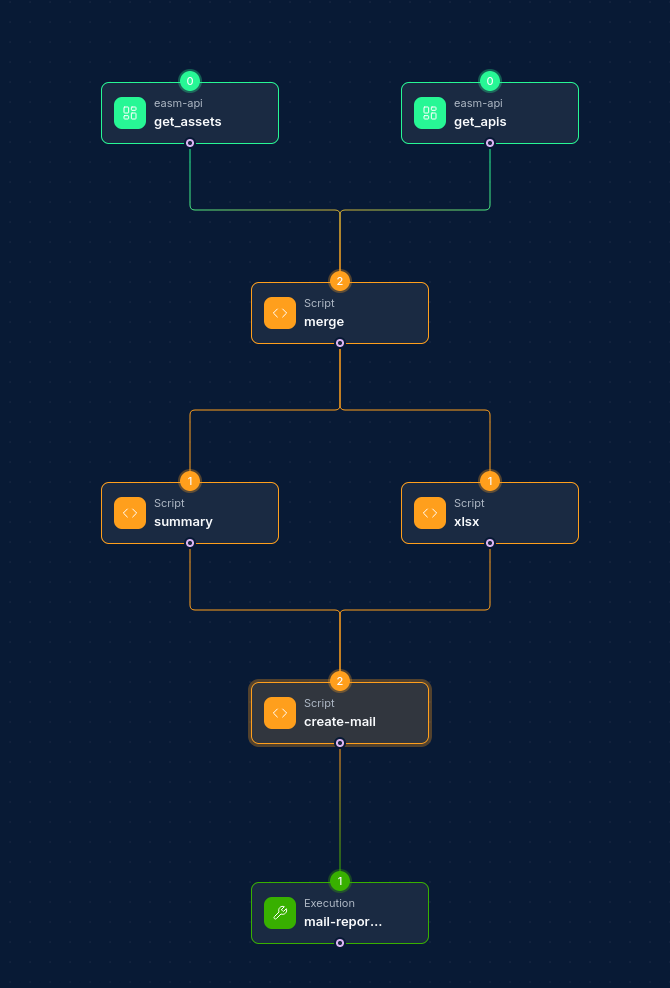
- Combining results from multiple tools
- Data analysis and visualization
- Custom API integration
- Report generation
Creating a Script Node
Basic Setup
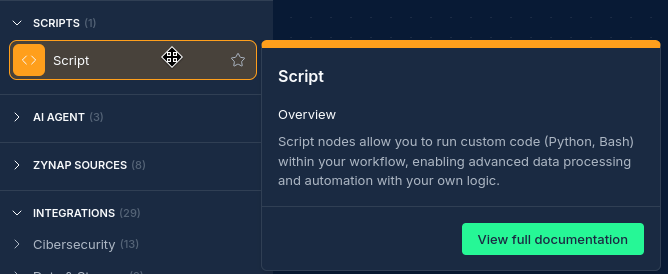
- Drag a Script Node from the node palette onto your workflow canvas
- Connect it to one or more input nodes
- Select a script language (Python or AI)
- Write or paste your script code or an AI prompt
Script Types
Script Nodes support two primary script types:
1. Python Scripts
Python scripts offer powerful data processing capabilities with access to numerous libraries:
import argparse
import json

def main():
    parser = argparse.ArgumentParser(description="Process domains")
    parser.add_argument('-i', help="Comma-separated input file paths")
    parser.add_argument('-o', help="Output file path", required=True)
    args = parser.parse_args()

    # Process input files
    input_files = args.i.split(',') if args.i else []

    results = []
    for input_file in input_files:
        with open(input_file, 'r') as f:
            for line in f:
                if line.strip():
                    results.append(line.strip())

    # Write results to output file
    with open(args.o, 'w') as f:
        for result in results:
            f.write(f"{result}\n")

if __name__ == "__main__":
    main()
2. AI Scripts
AI scripts use Claude to automatically generate a script based on your prompt:
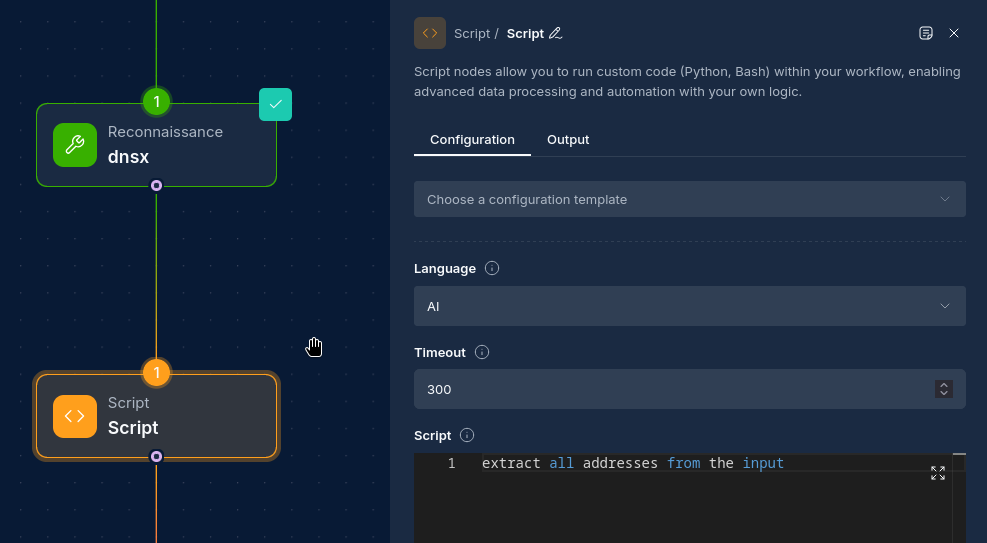
- Select "AI" as the language
- In the script editor, write a natural language prompt describing what you want the script to do
- The system will automatically generate a Python script when the node runs, automatically analysing input data from upstream nodes
Configuration Options
Node Properties
| Property | Description |
|---|---|
| Name | A descriptive name for the node |
| Language | Python or AI |
| Script | The code or prompt to execute |
| Timeout | Maximum execution time in seconds (default: 300, max: 1000) |
How Script Nodes Work
Script Nodes follow a standard execution pattern:
- When the workflow runs, the Script Node receives input data from upstream nodes
- For AI scripts, the AI agent analyzes the input data and generates a Python script according to the prompt
- The system automatically populates the
-iand-oarguments:- The
-iargument contains comma-separated paths to all upstream node output files - The
-oargument contains the path where this node should write its output
- The
- The script processes the input data and writes output to the specified path
- The output is made available to downstream nodes in the workflow
Writing Effective Python Scripts
Python scripts must follow this structure:
- Use
argparseto handle input and output parameters (these will be populated automatically) - Read input from files specified with the
-iargument (these are paths to upstream node outputs) - Write output to the file specified with the
-oargument (path where this node should write its output) - Handle errors gracefully
- Leverage available Python libraries as needed
Important Note: You do not need to specify the
-iand-oarguments when running the node. The system automatically populates these parameters with the correct file paths based on the node's connections.
Example Python Script Template
import argparse

def main():
    parser = argparse.ArgumentParser(description="Script description")
    parser.add_argument('-i', help="Comma-separated input file paths")
    parser.add_argument('-o', help="Output file path", required=True)
    args = parser.parse_args()

    if not args.i:
        print("No input files specified")
        return

    # Map filenames to paths for easier access
    input_files = {path.split('/')[-1]: path for path in args.i.split(',')}

    # Access specific files by node names
    # Example:
    # file_path = input_files.get('subfinder')
    # "subfinder" being the connected node's name


    # Process input files and generate results
    # ...

    # Write results to output file
    with open(args.o, 'w') as outfile:
        # Write your results here
        pass

if __name__ == "__main__":
    main()
Creating Effective AI Prompts
When using AI to generate scripts, follow these guidelines:
- Be specific about what you want the script to do
- Mention the expected input format and structure
- Describe the desired output format
- Include any special processing or transformation requirements
- Specify error handling or edge cases to consider
Important Note: The more specific the prompt is, the more precise the AI result will be
Example AI Prompt
Create a script that extracts all unique domains from the subfinder output from the "domain" key, filters out any domains containing 'test' or 'dev', and generates a report with the count of domains per top-level domain (TLD).
The AI will automatically:
- Analyze input data from upstream nodes
- Determine the structure and format of the data
- Generate a Python script that performs the requested operations
- Include proper error handling and file processing logic
- Add the required argument parsing to handle the automatically-provided
-iand-oarguments
Available Libraries and Tools
Script Nodes have access to numerous libraries and tools:
Python Libraries
- Data processing: pandas, numpy
- Network tools: requests, httpx, aiohttp, scapy, netaddr, dpkt, urllib3, mechanize
- Security tools: cryptography, pyjwt, pyOpenSSL, paramiko, shodan, censys, pycryptodome, impacket, pwntools
- Web scraping & browser automation: bs4 (BeautifulSoup), lxml, beautifulsoup4, selenium (drives a headless Chromium — see Headless Browser (Chromium))
- Parsing: json, csv, xmltodict, oyaml, python-magic
- Reporting: reportlab, WeasyPrint, xhtml2pdf, python-pptx, plotting with matplotlib
Command Line Tools
- Network tools: curl, dig, whois, netcat-openbsd, iputils-ping, traceroute
- Text processing: grep, ripgrep, jq, yq, gron, unfurl
- File operations: zip, rsync, git, anew
Headless Browser (Chromium)
Script Nodes can drive a real headless Chromium browser through Selenium. This is useful for:
- Fetching pages that need JavaScript to render before you can read them
- Capturing the rendered text or HTML of a page
- Producing browser-accurate PDFs of HTML/CSS — a higher-fidelity option than
xhtml2pdf/WeasyPrint when you need exact browser rendering (gradients, flexbox, web fonts, JavaScript-driven content)
The environment provides everything needed — a pinned Chromium, a matching ChromeDriver at /usr/bin/chromedriver, and a writable browser home — so your script only sets a few launch flags. You do not need to set the Chromium binary path, configure HOME, or download a driver.
Required launch flags
Because Script Nodes run in a hardened sandbox (read-only filesystem, no privileged operations), Chromium must be launched with these flags or it will fail to start or crash mid-run:
| Flag | Why it's required |
|---|---|
--headless=new | No display is available in the sandbox |
--no-sandbox | The node is already sandboxed; Chromium's own sandbox cannot initialize |
--disable-dev-shm-usage | Routes shared memory to /tmp; without it the tab crashes on non-trivial pages |
--user-data-dir=/tmp/chrome-<unique> | The browser profile must live on the writable /tmp (use a unique name per run) |
--disable-gpu | Recommended — no GPU is available |
Note: The browser runs headless only and cannot launch other external programs — it is for fetching, rendering, and capturing web pages. Always point Selenium at the system driver with
Service("/usr/bin/chromedriver").
Example: Save a page's text to the output
Fetches a URL (taken from the first input file, or a default) and writes the rendered page text to -o.
import argparse
import os
from selenium import webdriver
from selenium.webdriver.chrome.service import Service
from selenium.webdriver.chrome.options import Options


def make_driver():
    options = Options()
    for flag in ("--headless=new", "--no-sandbox", "--disable-dev-shm-usage",
                 "--disable-gpu", "--user-data-dir=/tmp/chrome-%d" % os.getpid()):
        options.add_argument(flag)
    return webdriver.Chrome(service=Service("/usr/bin/chromedriver"), options=options)


def main():
    parser = argparse.ArgumentParser(description="Fetch a page with a headless browser and save its text")
    parser.add_argument('-i', help="Comma-separated input file paths")
    parser.add_argument('-o', help="Output file path", required=True)
    args = parser.parse_args()

    # Take the target URL from the first line of the first input file, or use a default
    url = "https://example.com"
    if args.i:
        with open(args.i.split(',')[0], 'r', encoding='utf-8') as f:
            first_line = f.readline().strip()
            if first_line:
                url = first_line

    driver = make_driver()
    try:
        driver.get(url)
        text = driver.find_element("tag name", "body").text
    finally:
        driver.quit()

    with open(args.o, 'w', encoding='utf-8') as f:
        f.write(text)


if __name__ == "__main__":
    main()
Example: Save a page as a PDF to the output
Renders a URL — or a full HTML document supplied via the input file — to a PDF using Chrome's native print-to-PDF, and writes it to -o.
import argparse
import base64
import os
import time
from selenium import webdriver
from selenium.webdriver.chrome.service import Service
from selenium.webdriver.chrome.options import Options
from selenium.webdriver.common.print_page_options import PrintOptions


def make_driver():
    options = Options()
    for flag in ("--headless=new", "--no-sandbox", "--disable-dev-shm-usage",
                 "--disable-gpu", "--user-data-dir=/tmp/chrome-%d" % os.getpid()):
        options.add_argument(flag)
    return webdriver.Chrome(service=Service("/usr/bin/chromedriver"), options=options)


def main():
    parser = argparse.ArgumentParser(description="Render a page or HTML to a PDF with a headless browser")
    parser.add_argument('-i', help="Comma-separated input file paths")
    parser.add_argument('-o', help="Output PDF file path", required=True)
    args = parser.parse_args()

    # The first input file may hold a URL or a full HTML document; default to a URL
    source = "https://example.com"
    if args.i:
        with open(args.i.split(',')[0], 'r', encoding='utf-8') as f:
            content = f.read().strip()
        if content.startswith(("http://", "https://", "file:")):
            source = content
        elif content:
            # Treat the file's contents as an HTML document
            source = "data:text/html;base64," + base64.b64encode(content.encode()).decode()

    driver = make_driver()
    try:
        driver.get(source)
        time.sleep(2)  # give JavaScript and fonts time to render
        print_options = PrintOptions()
        print_options.background = True  # include CSS backgrounds and colours
        pdf_bytes = base64.b64decode(driver.print_page(print_options))
    finally:
        driver.quit()

    with open(args.o, 'wb') as f:
        f.write(pdf_bytes)


if __name__ == "__main__":
    main()
PDF tip:
print_options.background = Trueensures CSS background colours and gradients are included. For lighter, browser-free HTML→PDF (no JavaScript), WeasyPrint remains available and renders CSS well without launching a browser.
Best Practices
- Input Handling: Always validate and clean input data
- Error Management: Include proper error handling for missing files or invalid data
- Resource Efficiency: Process large files in chunks or use efficient algorithms
- Output Formatting: Format output consistently for downstream nodes
- Descriptive Naming: Use clear, descriptive variable and function names
Troubleshooting
| Issue | Resolution |
|---|---|
| Script execution timeout | Increase the timeout value or optimize your code for better performance |
| Missing input files | Check upstream node connections and verify input file paths |
| Import errors | Verify required libraries are being used correctly |
| Output format issues | Ensure your output matches what downstream nodes expect |
| AI-generated script errors | Refine your prompt to be more specific or handle the case manually |
Examples
Example 1: Data Transformation Script
import argparse
import json

def main():
    parser = argparse.ArgumentParser(description="Transform JSON data to CSV")
    parser.add_argument('-i', help="Comma-separated input file paths")
    parser.add_argument('-o', help="Output file path", required=True)
    args = parser.parse_args()

    if not args.i:
        print("No input files specified")
        return

    results = []
    for input_file in args.i.split(','):
        with open(input_file, 'r') as f:
            for line in f:
                if line.strip():
                    try:
                        data = json.loads(line.strip())
                        if 'host' in data and 'status_code' in data:
                            results.append(f"{data['host']},{data['status_code']}")
                    except json.JSONDecodeError:
                        continue

    with open(args.o, 'w') as f:
        f.write("host,status_code\n")  # CSV header
        for result in results:
            f.write(f"{result}\n")

if __name__ == "__main__":
    main()
Example 2: Combining Multiple Inputs
import argparse

def main():
    parser = argparse.ArgumentParser(description="Combine subdomain and port scan results")
    parser.add_argument('-i', help="Comma-separated input file paths")
    parser.add_argument('-o', help="Output file path", required=True)
    args = parser.parse_args()

    if not args.i:
        print("No input files specified")
        return

    # Map filenames to paths
    input_files = {path.split('/')[-1]: path for path in args.i.split(',')}

    subfinder_path = next((path for name, path in input_files.items() if 'subfinder' in name), None)
    nmap_path = next((path for name, path in input_files.items() if 'nmap' in name), None)

    if not subfinder_path or not nmap_path:
        print("Missing required input files")
        return

    # Read subdomains
    with open(subfinder_path, 'r') as f:
        domains = [line.strip() for line in f if line.strip()]

    # Read port scan results
    with open(nmap_path, 'r') as f:
        ports = {}
        current_host = None
        for line in f:
            if line.strip().endswith("open"):
                parts = line.strip().split()
                if len(parts) >= 2:
                    port = parts[0]
                    if current_host and port:
                        if current_host not in ports:
                            ports[current_host] = []
                        ports[current_host].append(port)
            elif line.strip() and not line.startswith("#"):
                # Assume this is a host line
                current_host = line.strip()

    # Combine results
    with open(args.o, 'w') as f:
        for domain in domains:
            if domain in ports:
                for port in ports[domain]:
                    f.write(f"{domain}:{port}\n")
            else:
                f.write(f"{domain}\n")

if __name__ == "__main__":
    main()
Example 3: AI Prompt for Data Analysis
Create a Python script that:
1. Takes the output from httpx containing status codes and titles
2. Groups results by status code
3. Identifies potential vulnerabilities based on common patterns in titles or response codes
4. Generates a summary report with counts and potential security issues
5. Formats the output as a structured JSON file
Next Steps
After configuring your Script Node, you might want to:
- Feed the output to Integration Nodes to send results to external systems
- Link to a security tool
- Use Report Nodes to generate visual reports from your processed data
- Add more Script Nodes for additional data transformation steps
Updated: 2026-06-09